
In today’s globalized world, language is no longer a barrier—thanks to AI. One of the most practical and impactful applications of Azure Cognitive Services is language translation. Whether it’s for international customer support, global e-commerce, or multilingual education platforms, Azure Translator makes it easy to integrate translation capabilities into any application.
Here’s how I built a real-time language translation app using Azure Translator—in under 30 minutes.
🛠️ What You Need:
- Azure Subscription (Free tier works!)
- Azure Translator Resource (part of Cognitive Services)
- HTML + JavaScript (for frontend)
- Optional: Azure Functions or Web API (for backend)
🚀 Steps to Build:
1️⃣ Create Azure Translator Resource
- Go to Azure Portal → Create Resource → Search for “Translator”
- Choose pricing tier (free available) and copy your key and endpoint
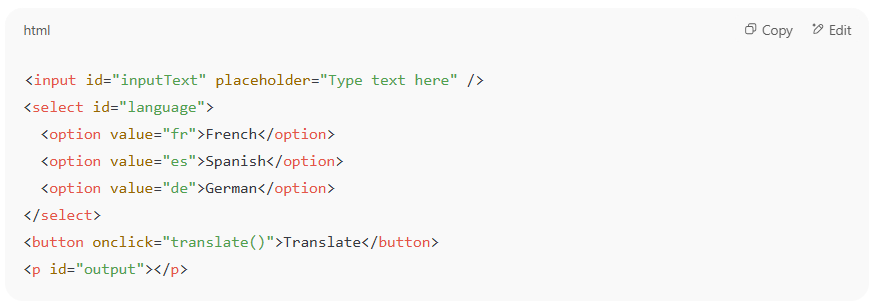
2️⃣ Build a Simple Web Interface
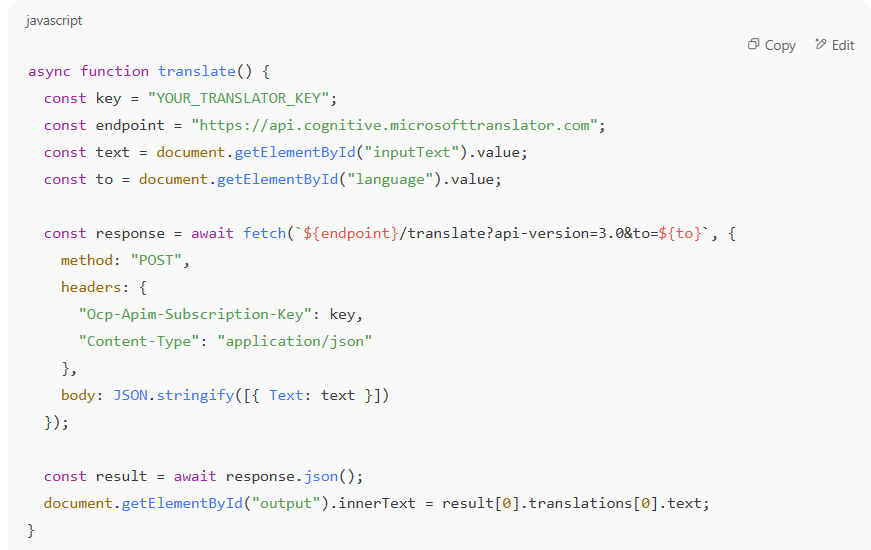
3️⃣ Connect to Azure Translator
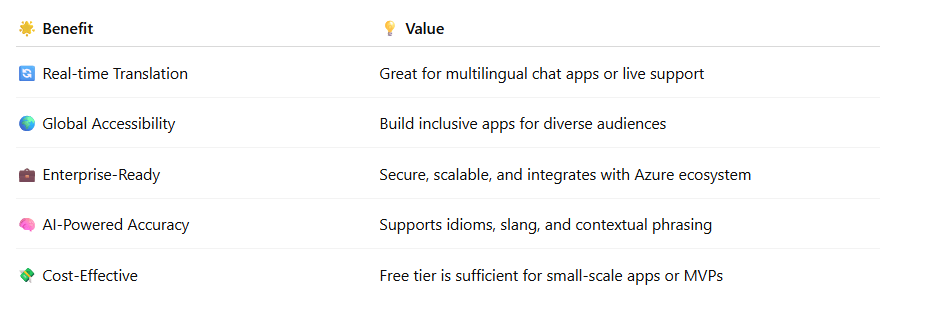
✅ Real-World Benefits:
💡 Use Cases in the Real World
- Customer Support Bot that speaks your customer’s language
- E-commerce Platform with localized product descriptions
- Language Learning App for real-time phrase translations
- Healthcare Forms translation for diverse patients
- Government/NGO Services for migrants or expats
🎯 Final Thought
Building intelligent apps with Azure AI doesn’t require deep ML knowledge. With services like Azure Translator, you can easily add value, inclusivity, and innovation to your applications.
If you’re a developer, architect, or even a product manager—this is a great place to start your AI journey with Azure.
Let me know if you’d like the GitHub template for this app!
 First Crazy Developer
Leave a comment