
Agent-based apps are the future of intelligent automation. With Azure AI Studio, Microsoft has created an intuitive yet powerful platform that allows developers and architects to design, test, and deploy AI agents that can reason, plan, and act on your enterprise data.
In this blog, I’ll walk you through:
What agent-based apps are Why Azure AI Studio is ideal for building them Step-by-step guide to creating your first agent A diagram that explains the architecture Real-world scenarios and my take as an architect
🧠 What is an Agent-Based Application?
An AI agent is more than just a model response. It’s a software construct that:
Has a goal Can plan steps to achieve it Calls tools and APIs Retrieves knowledge from multiple sources (e.g., docs, DBs) Makes decisions dynamically
Think of it like a junior analyst: it can be given a task, gather context, act across apps, and report back.
💼 Why Use Azure AI Studio?
Azure AI Studio brings developer tools, foundation models, vector search, and orchestration together under one roof. It supports:
✅ Microsoft & Open-source models (GPT-4, Phi-3, Mistral, etc.)
✅ Visual design of agent orchestration using Prompt Flow
✅ Integration with Cognitive Search, Azure Functions, APIs
✅ Fine-tuning and prompt evaluation tools
✅ Enterprise-grade compliance & security
🛠️ Steps to Build Your Agent-Based App in Azure AI Studio
✅ Step 1: Access Azure AI Studio
Go to https://ai.azure.com
Use your Azure subscription to get started. Select a project directory or create one.
✅ Step 2: Create a New Project
Click “Create Project” and choose a Prompt Flow-based project or Custom Agent App.
Name it something like CustomerSupportAgent.
Choose your preferred model (e.g., GPT-4, Phi-3, or open models hosted via Azure).
✅ Step 3: Design the Agent Workflow Using Prompt Flow
Azure AI Studio supports drag-and-drop flow creation.
In Prompt Flow, create:
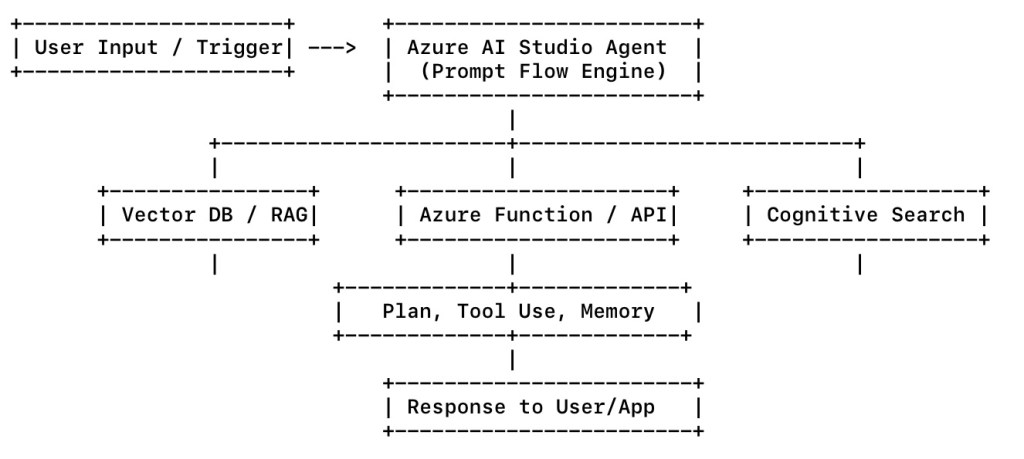
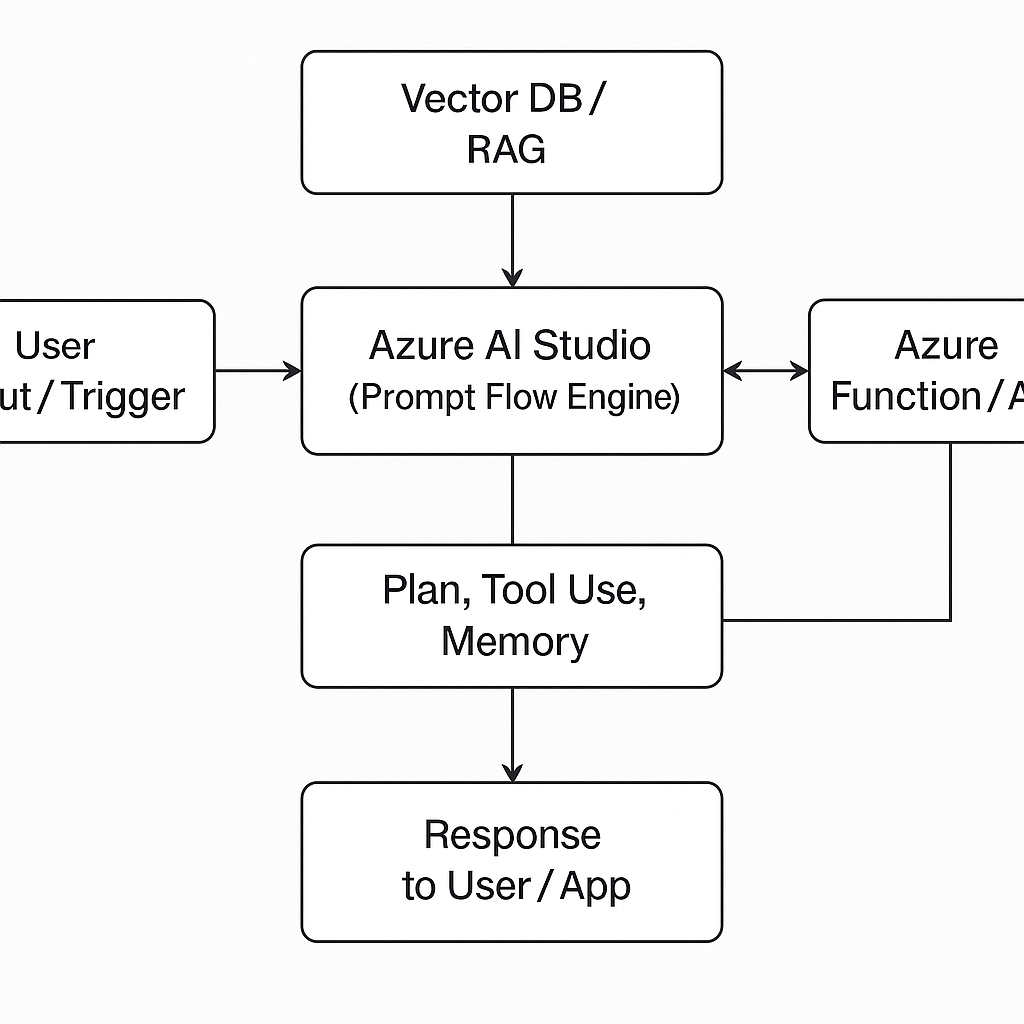
Input Block – user question or system event Planning Block – let the agent determine the steps Tool Invocation Blocks – call APIs, DBs, or use Python scripts Memory/Storage Block – allow recall from previous steps Response Block – generate the final output
💡 Tip: Add conditional routing and multi-turn memory for more realistic behavior.
✅ Step 4: Add Tools or Functions
Agents don’t operate in a vacuum—they use tools. In Azure AI Studio:
Add Cognitive Search tool to connect to internal documents Use Azure Function to call SAP, CRM, or third-party APIs Add custom Python tool to compute logic, retrieve data, etc.
Each tool has its own input/output schema and parameters.
✅ Step 5: Connect to Vector Index (Optional for RAG)
Use Azure AI Search or Azure OpenAI On Your Data
Upload files → Embed with embedding model → Link to agent
This enables context-aware retrieval before answering queries.
✅ Step 6: Test Your Agent
Use the built-in Test Chat Interface to simulate user input
You can view:
API calls made Latency per tool Token usage Final and intermediate answers
✅ Step 7: Deploy Your Agent App
Once tested, deploy using:
Azure Web App Azure Function endpoint API Management Gateway
You can embed the app in Teams, Web, Mobile, or use it as a back-end for workflows.
✅ Step 8: Monitor, Evaluate, and Improve
Use Azure’s built-in tools:
Prompt Evaluation for responses Cost and token tracking Rate limiting and logging Feedback loops and retraining
📊 Diagram: Azure AI Studio Agent-Based App Architecture
🌍 Real-World Use Cases
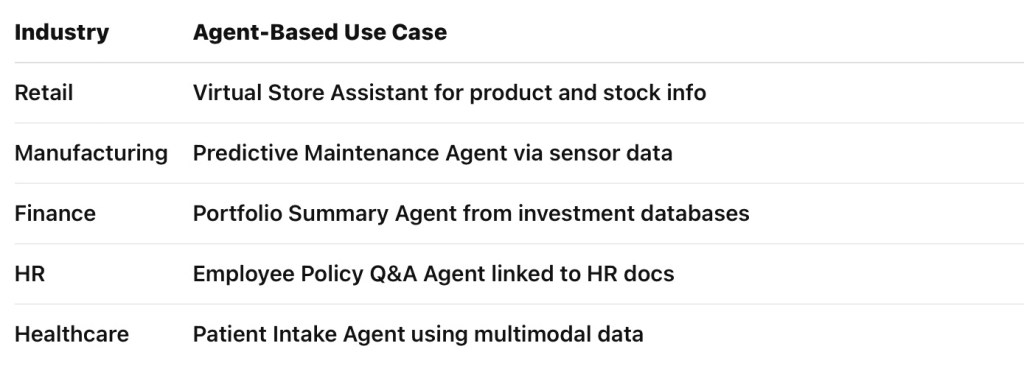
Here are just a few enterprise examples:
🧩 Abhishek’s Take
“Agent-based systems are the new backend workforce. With Azure AI Studio, you can build these digital employees—no need to wire things manually anymore. The orchestration layer lets developers focus on what the agent should do, not how the data is fetched and merged.”
✅ Final Words
Azure AI Studio makes building intelligent agents not only possible—but fast, secure, and scalable. You no longer need to manage everything in code. With tools like Prompt Flow, cognitive search, and pre-wired tools, building enterprise-ready agents becomes a low-friction, high-impact process.
So whether you’re starting your AI journey or scaling it across the enterprise—start building agents with Azure AI Studio today.
#AzureAI #AzureAIStudio #AgenticAI #PromptFlow #AIStudio #MicrosoftAzure #LLMOps #GenerativeAI #AIFoundry #EnterpriseAI #AIWithAzure #AbhishekOnAI #DigitalTransformation #AIAgents #VectorSearch #RAG #AIApplications #AzureDeveloper
 First Crazy Developer
Leave a comment