
By Abhishek Kumar — Azure AI Foundry Expert | Technical Architect
📌 Introduction: What is Hybrid RAG?
In today’s enterprise AI world, we need models that don’t hallucinate and can use your internal knowledge safely and accurately.
This is where RAG (Retrieval-Augmented Generation) comes in.
Hybrid RAG takes it a step further — combining:
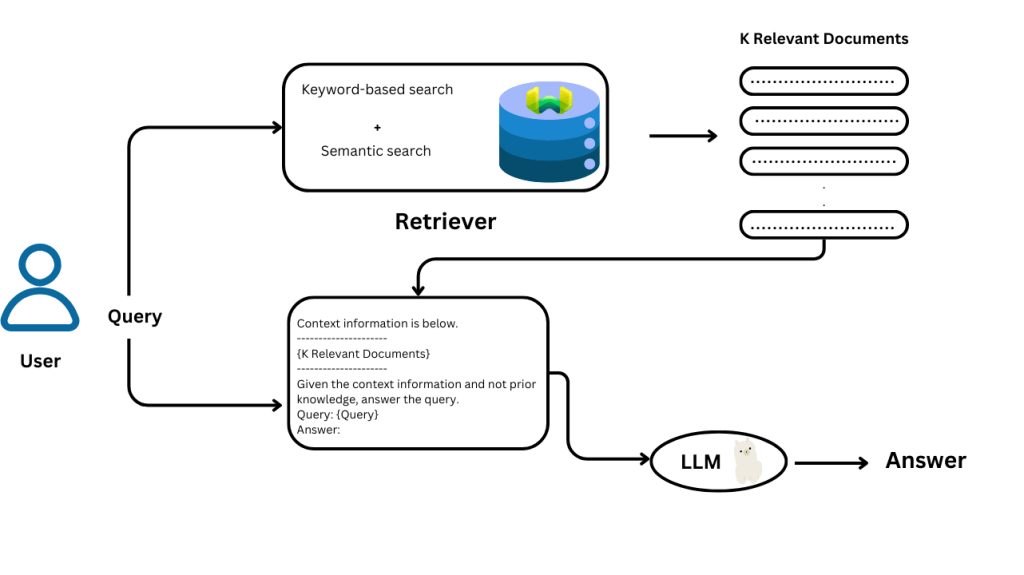
Keyword-based search (like traditional search engines) Vector-based semantic search (AI that understands meaning)
Together, Hybrid RAG helps AI models retrieve accurate, meaningful, and relevant data before answering any user query.
🧠 Why Use Hybrid RAG?
Here’s a simple analogy:
Imagine you’re preparing a report.
You search documents by keywords (“Q4 revenue”) and also use your memory of what those documents were about (semantic understanding).
That’s what Hybrid RAG does — combining both strengths.
✅ More accurate answers
✅ Works with large document repositories
✅ Handles both structured and unstructured data
✅ Reduces hallucination
✅ Maintains context and relevance
🏗️ What Tools Are Involved?
To build Hybrid RAG on Azure, you use:
| Tool | Purpose |
|---|---|
| Azure Cognitive Search | Keyword & metadata-based search |
| Vector Database (Azure AI Search / Cosmos DB) | Semantic search using embeddings |
| Azure OpenAI (GPT) | Language model to generate responses |
| Azure AI Studio / Prompt Flow | Workflow and orchestration |
| Azure Blob / Data Lake | Store source documents (PDF, DOCX, HTML, etc.) |
| LangChain / Semantic Kernel (Optional) | Chaining logic and embedding models |
🔧 Step-by-Step: Building a Hybrid RAG Solution on Azure
✅ Step 1: Upload Your Documents to Azure Blob Storage
- Go to portal.azure.com
- Create a Storage Account
- Upload your files into a Blob container
(e.g., PDFs, DOCXs, emails, etc.)
✅ Step 2: Set Up Azure Cognitive Search
- Go to Azure Cognitive Search
- Create a new Search Service
- Define an Indexer:
- Connect it to your Blob Storage
- Enable text extraction using Azure AI Document Intelligence
- Configure fields like
title,content,metadata, etc. - Publish your search index
🧠 This gives you keyword and metadata searching.
✅ Step 3: Generate Embeddings for Vector Search
You’ll need to turn text into vectors (numerical meaning) for semantic search.
- Use Azure OpenAI Embedding Model (e.g.,
text-embedding-ada-002) - Chunk your documents into smaller sections (e.g., 200-500 tokens)
- For each chunk:
- Pass the text to the embedding model
- Store the vector along with metadata
You can store embeddings in:
- Azure Cognitive Search with vector indexing
- Or Cosmos DB for PostgreSQL + pgvector
- Or open-source vector DBs like Qdrant or Pinecone (hosted externally)
✅ Step 4: Implement Hybrid Search Logic
Now, the magic happens:
- User asks a question
- Your system:
- Queries Azure Cognitive Search (keyword match)
- Queries Vector DB (semantic match)
- Merge and rerank results
- Feed top documents into your language model prompt
Example prompt:
“Answer the following based on the provided documents:\n\nDocuments:\n[DOCS]\n\nQuestion: [USER QUESTION]”
- GPT processes this and generates the final answer
✅ Step 5: Use Prompt Flow or LangChain to Automate the Flow
You can use:
- Prompt Flow in Azure AI Studio for visual pipeline creation
- LangChain or Semantic Kernel if you’re coding in Python or C#
This helps automate:
- Query parsing
- Vector & keyword search
- Merging results
- Prompt formatting
- GPT calling
- Response return
✅ Step 6: Deploy the RAG App
- Use Azure AI Studio to host the full app
- Or deploy as a Function App or Web App
- Integrate with Microsoft Teams, Chatbot, or your web portal
Add user authentication using Entra ID for secure access.
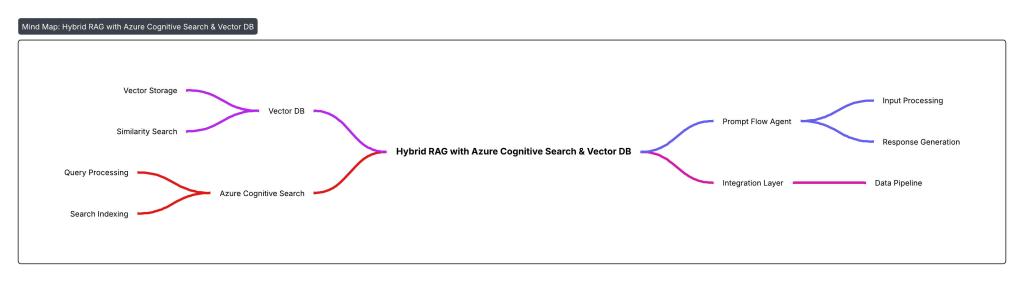
🖼️ Architecture Diagram (Text Representation)
User Query
    |
    v
+-------------------+
| Prompt Flow Agent |
+-------------------+
        |
        |-------------------+
        |                   |
        v                   v
[Azure Cognitive Search]   [Vector DB Search (Embeddings)]
        |                   |
        +---------+---------+
                  |
           Merge Results
                  |
          Build GPT Prompt
                  |
         Call Azure OpenAI GPT
                  |
         Generate Final Answer
                  |
            Return to User
🌍 Real-Life Use Cases
| Industry | Hybrid RAG Application Example |
|---|---|
| Legal | Case law research assistant |
| HR | Policy FAQ bot connected to HR documents |
| Finance | Portfolio Q&A using earnings reports and memos |
| Healthcare | Medical guideline assistant (keywords + context match) |
| Manufacturing | Maintenance assistant using manuals + reports |
🧩 Abhishek’s Take
“Hybrid RAG bridges the gap between traditional document search and true AI-powered understanding. With Azure AI Studio, it’s now accessible to every enterprise.”
I recommend Hybrid RAG for any organization with hundreds or thousands of documents—because even the smartest model needs a compass when dealing with your business knowledge.
✅ Final Thoughts
Hybrid RAG with Azure Cognitive Search and Vector DB is a game-changer:
- 🔒 It keeps your data secure
- 🤖 It gives accurate, explainable answers
- 🧠 It allows AI to think with your documents
- ⚙️ It integrates easily into enterprise workflows
And best of all? Azure makes it simple to scale and govern.
#AzureAI #HybridRAG #VectorSearch #AzureOpenAI #AIStudio #PromptFlow #EnterpriseAI #GenerativeAI #LLMOps #RAGPipeline #MicrosoftAzure #AIForBusiness #SearchWithAI #AbhishekOnAI #AIArchitecture #AIFoundry
 First Crazy Developer
Leave a comment