
By Abhishek Kumar — Azure AI Foundry Expert | Technical Architect
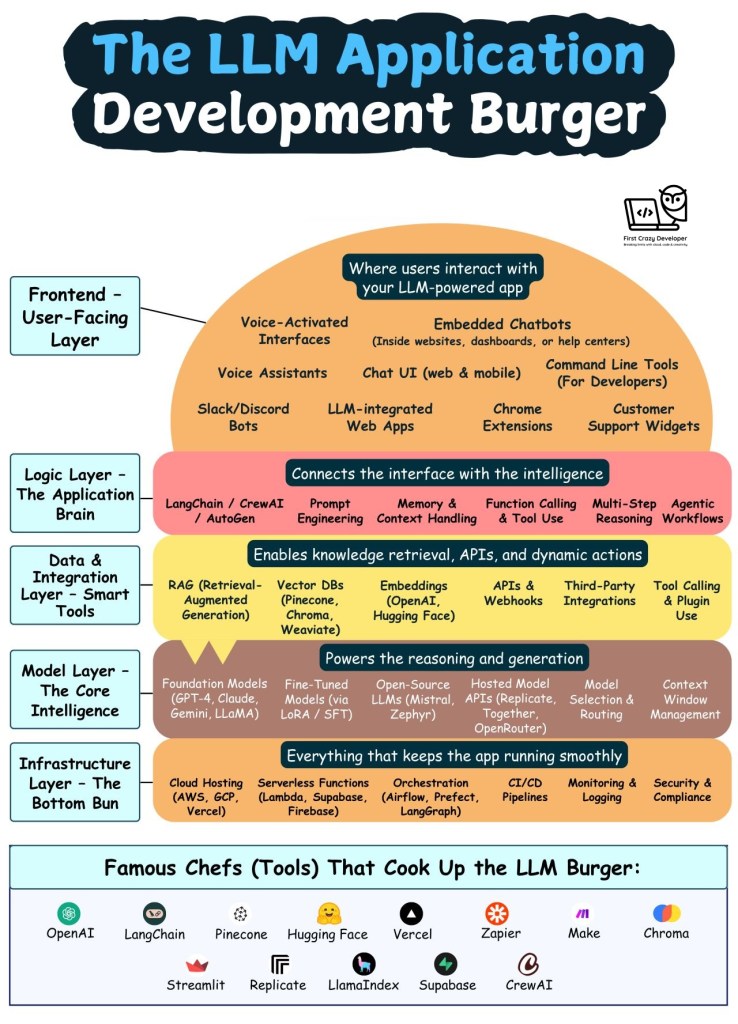
Imagine you’re crafting the perfect burger—each layer carefully chosen to build something delicious. Now, think of building a GenAI (Generative AI) application the same way.
Just like a burger, every layer in your AI app matters—from the juicy intelligence in the middle to the user-friendly top bun. Let’s break down each layer of the “LLM Burger Stack” that powers intelligent applications today.
🧱 1. Foundation Layer – The Bottom Bun
The strength beneath everything.
Every great app needs a solid base. This layer includes all the backend infrastructure that keeps your GenAI app running smoothly:
- Cloud platforms (like Azure, AWS, or GCP)
- Serverless compute (e.g., Azure Functions, AWS Lambda)
- CI/CD pipelines for automation
- Kubernetes or container orchestration
- Logging, monitoring, and security best practices
Without this layer, everything else could fall apart—just like a burger without a bun.
🧠 2. Model Layer – The AI Brain
The patty that gives your app real power.
This is where the intelligence lives. It includes:
- Foundation models like GPT-4, Claude, LLaMA, and Mistral
- APIs for accessing these models
- Fine-tuned or domain-specific variations
- Token and context management to handle long inputs and outputs
The model layer is what gives your application the ability to understand, reason, and generate responses.
🧩 3. Data & Integration Layer – The Toppings with Flavor
Where your app gets context, freshness, and flavor.
Want your app to answer questions with up-to-date, accurate info? That’s where this layer comes in:
- Retrieval-Augmented Generation (RAG)
- Vector databases like Pinecone, Weaviate, or Chroma
- Embedding models to store and search context
- APIs, plugins, webhooks to connect with external tools and data
This layer enables real-time, context-rich AI responses.
🧠 4. Logic & Reasoning Layer – The Sauce and Spices
Where intelligence meets planning.
Here’s where things get interactive and thoughtful:
- Agents (like CrewAI or AutoGen) for multi-step problem solving
- LangChain, Semantic Kernel, or custom orchestrators
- Tool usage and memory to simulate real-time thinking
- Dynamic workflows, decision trees, and user-specific logic
This layer makes your app feel like it’s truly “thinking” through tasks.
💬 5. User Interface Layer – The Top Bun
The part users see, touch, and remember.
This is what people interact with:
- Web and mobile UIs
- Chatbots (in Slack, Teams, WhatsApp, etc.)
- Voice assistants and browser extensions
- Command-line tools or embedded chat windows
A beautiful top bun makes the whole burger appealing—your UI should be just as delightful!
👨🍳 Star Chefs Behind the Stack
Think of the following tools and platforms as the chefs who help you bring it all together:
- OpenAI – Advanced language models
- Hugging Face – Open-source model library
- Pinecone / Chroma / Weaviate – Vector databases for fast retrieval
- LangChain / CrewAI – Agents and orchestration
- Zapier / Make.com – Integration with apps and tools
- Vercel / Netlify – Frontend hosting
🍽️ Final Thoughts
Building a GenAI app isn’t just about plugging in a language model. It’s about carefully layering infrastructure, intelligence, integrations, logic, and interface—just like assembling the perfect burger.
Whether you’re a developer, architect, or product owner, knowing how these layers work together is the secret sauce to crafting a powerful AI experience.
#GenAI #GPT4 #LangChain #AIApps #PromptEngineering #VectorDB #AIArchitecture #OpenAI #AIDevelopment #DeveloperLife #AzureAI #AbhishekKumar #FirstCrazyDeveloper
 First Crazy Developer
Leave a comment