

By Abhishek Kumar — #FirstCrazyDeveloper
Artificial Intelligence is moving fast. But building an AI prototype and building a production-grade AI platform are two very different challenges.
- A prototype can run in a Jupyter Notebook.
- A production-ready AI platform must handle real traffic, security, observability, scalability, and failures gracefully.
In this blog, I’ll break down how developers can architect such a system using Azure with step-by-step real-world examples.

🔑 1. Cloud Infrastructure — The Foundation
Every reliable AI platform begins with a solid cloud foundation.
⚡ Key Azure Components:
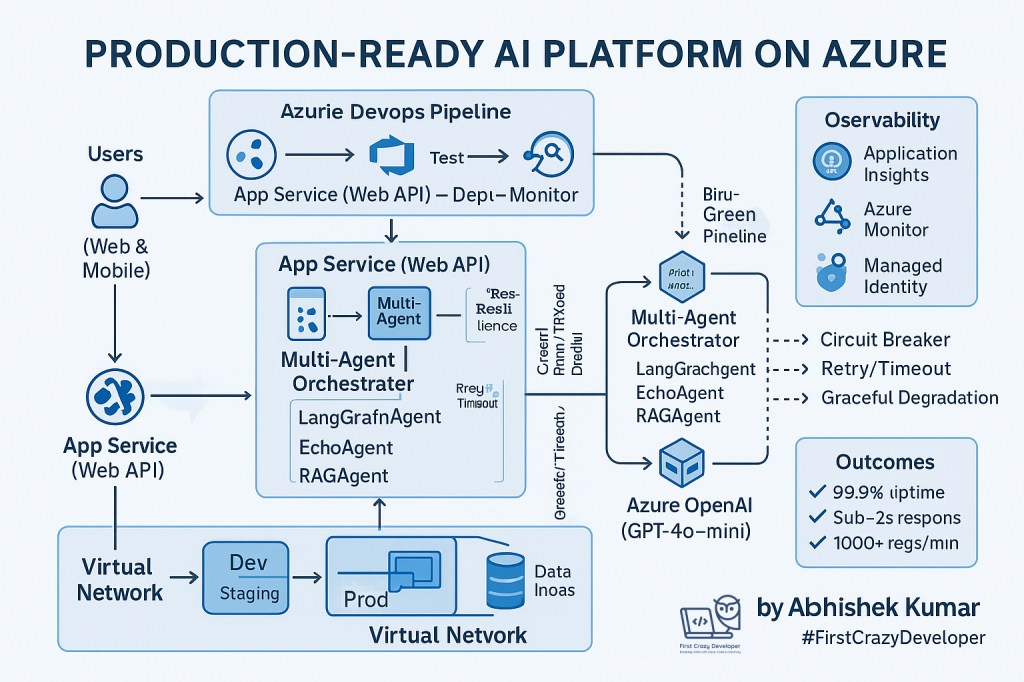
- Azure App Service – Host APIs or web apps with auto-scaling and zero downtime deployments.
- Azure Key Vault – Store API keys, secrets, and certificates securely.
- Azure OpenAI – Run powerful models like GPT-4, GPT-4o-mini for reasoning and natural language tasks.
🛠 Real-World Example:
Imagine you are building a Customer Support AI Assistant for a retail company.
- Frontend: A React web app where users type queries.
- Backend: An Azure App Service hosting APIs.
- AI Engine: Azure OpenAI (GPT-4) processes queries.
- Security: API keys and database connection strings are stored in Azure Key Vault, not hardcoded.
📌 Implementation tip:
az keyvault secret set --vault-name MyKeyVault --name "OpenAI-API-Key" --value "your_key_here"
In your backend code (C# or Python), you fetch the key at runtime using a Managed Identity — so developers never see the actual secret.
⚙️ 2. CI/CD Pipeline — Automating Deployment
A production AI platform needs fast, repeatable, and safe deployments.
⚡ Key Practices:
- Azure DevOps Pipelines (YAML) – Automate builds and deployments.
- Blue-Green Deployment – Keep one environment live while deploying to another. Switch traffic once the new release is validated.
- Rollback Strategy – If something fails, traffic instantly reverts to the old version.
🛠 Real-World Example:
- Scenario: Deploying a new “Sentiment Analysis API” in your Customer Support Assistant.
- Pipeline stages:
- Build – Package Python/C# API.
- Test – Run unit + integration tests.
- Deploy (Staging) – Deploy to staging slot.
- Smoke Test – Automated test calls the API.
- Swap to Production – Only if staging passes.

📌 YAML snippet (simplified):
stages:
- stage: Build
  jobs:
  - job: BuildAPI
    steps:
    - task: DotNetCoreCLI@2
      inputs:
        command: 'build'
        projects: '**/*.csproj'

- stage: Deploy
  jobs:
  - job: DeployAPI
    steps:
    - task: AzureWebApp@1
      inputs:
        appName: 'CustomerSupportAI'
        deployToSlotOrASE: true
        ResourceGroupName: 'AI-RG'
        SlotName: 'staging'
📊 3. Monitoring & Observability — Don’t Fly Blind
AI platforms must be monitored continuously.
⚡ Tools on Azure:
- Azure Monitor + Application Insights – Track API performance, request latency, errors.
- RBAC & Logging – Secure access logs for compliance.
- Alerts – Notify teams on Slack/Teams when error rate crosses threshold.
🛠 Real-World Example:
- The Sentiment Analysis API is getting timeouts from OpenAI service.
- Application Insights shows average response time increased from 1.8s → 5.3s.
- Alert triggers in Teams channel: “AI API Latency above threshold”.
- DevOps engineer investigates — finds Azure OpenAI was hitting rate limits → solution is to scale to multiple regions with traffic splitting.
📌 Query to analyze slow requests (Kusto Query Language):
requests
| where timestamp > ago(1h)
| summarize avg(duration) by operation_Name
🤖 4. AI Integration — Intelligence Layer
This is where the “AI” part comes in.
A production platform rarely relies on one big model. Instead, it uses multiple specialized agents.
⚡ Agent Architecture:
- LangGraphAgent → Reasoning & workflow control
- EchoAgent → Pattern-matching fallback (e.g., FAQs)
- RAGAgent → Retrieves context from vector DB (Pinecone/Weaviate/Azure Cognitive Search)
- Resilience Patterns → Circuit breakers, retries, graceful degradation
🛠 Real-World Example:
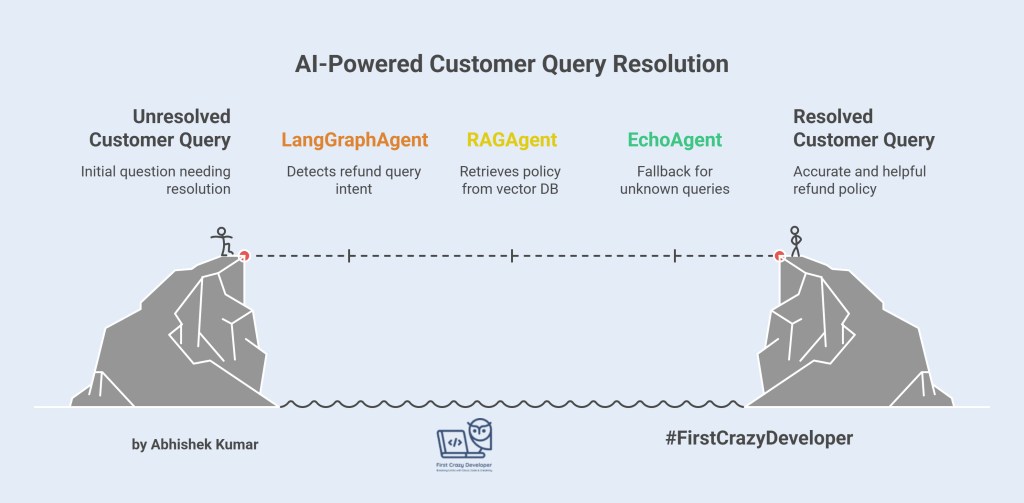
A customer asks:
“What’s the refund policy if I bought shoes last week?”
Flow:
- LangGraphAgent detects it’s a refund query.
- RAGAgent pulls refund policy from a PDF stored in Azure Blob + indexed in Cognitive Search.
- EchoAgent acts as a fallback if AI can’t find context → responds with “Please contact support, here’s the link.”
📌 Python Example:
from openai import AzureOpenAI
from langchain.chains import RetrievalQA
from langchain.vectorstores import FAISS

# Setup Azure OpenAI
client = AzureOpenAI(api_key="secret", api_version="2024-05-01")

# Connect RAG with Cognitive Search / Vector DB
qa_chain = RetrievalQA.from_chain_type(
    llm=client,
    retriever=my_vectorstore.as_retriever()
)

query = "What’s the refund policy for shoes?"
response = qa_chain.run(query)
print(response)
📈 5. Business Outcomes
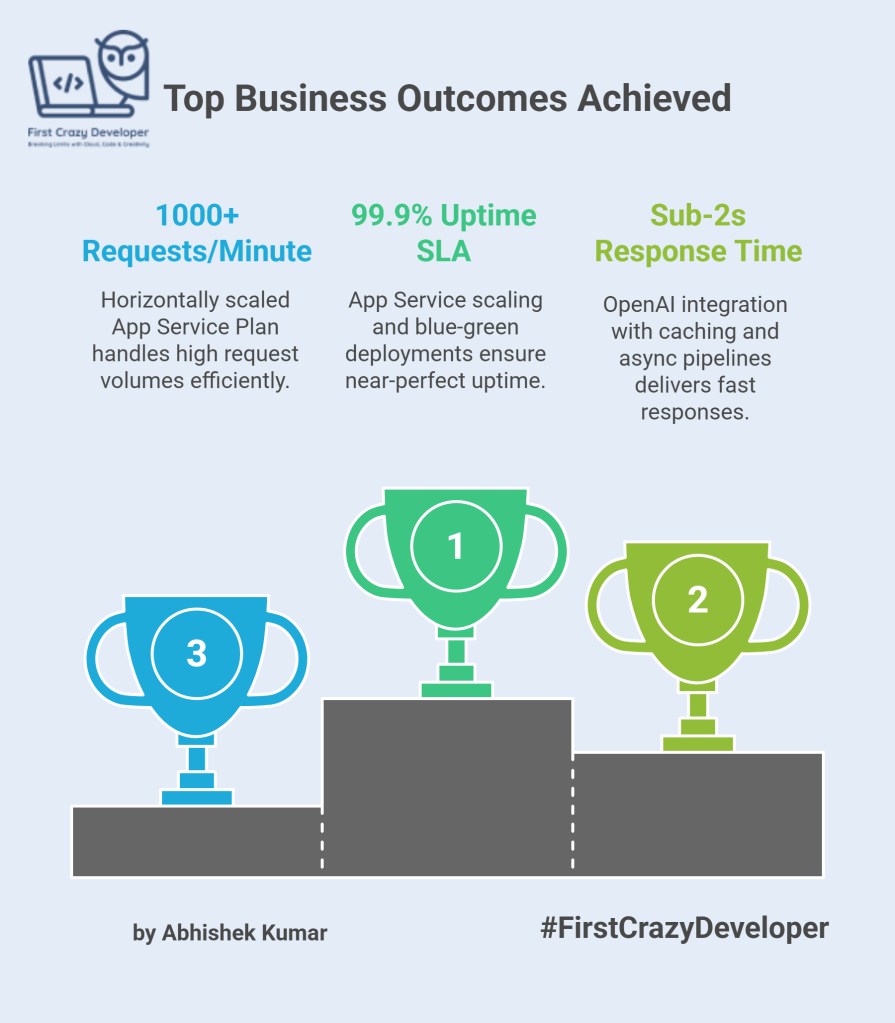
By following this approach, the platform achieved:
✅ 99.9% Uptime SLA – thanks to App Service scaling + blue-green deployments
✅ Sub-2s Response Time – OpenAI integration with caching + async pipelines
✅ 1000+ Requests/Minute – horizontally scaled App Service Plan
🌟 Final Thoughts for Developers
As developers, our challenge is not just to call an AI API but to engineer AI into production-ready systems.
The recipe for success:
- Cloud Foundation (Azure Services)
- Automated CI/CD
- Monitoring & Resilience
- AI Agent Orchestration (LangGraph, RAG, Fallbacks)
Once you combine these, your AI project moves from being a cool demo to a business-critical product.
✍️ Abhishek’s Take
Building AI in production is not about plugging in a model and hoping it works. It’s about engineering discipline — the same principles we apply to cloud, DevOps, and security must extend to AI systems.
From my experience, the success of an AI platform depends less on the model itself and more on the ecosystem around it:
- How you secure it (Key Vault, RBAC)
- How you scale it (App Service, auto-scaling)
- How you deploy it (CI/CD, blue-green, rollback)
- How you monitor it (Application Insights, alerts)
- How you orchestrate intelligence (multi-agent design)
A proof-of-concept can win attention, but a production-grade platform wins trust. And in enterprise AI, trust is the true differentiator.
By Abhishek Kumar
#FirstCrazyDeveloper | #AI | #Azure | #CloudComputing | #DevOps | #CloudComputing | #DevOps | #MachineLearning | #GenerativeAI | #OpenAI | #LangChain | #EnterpriseAI | #AbhishekKumar
 First Crazy Developer
Leave a comment