
✍️ By Abhishek Kumar | #FirstCrazyDeveloper
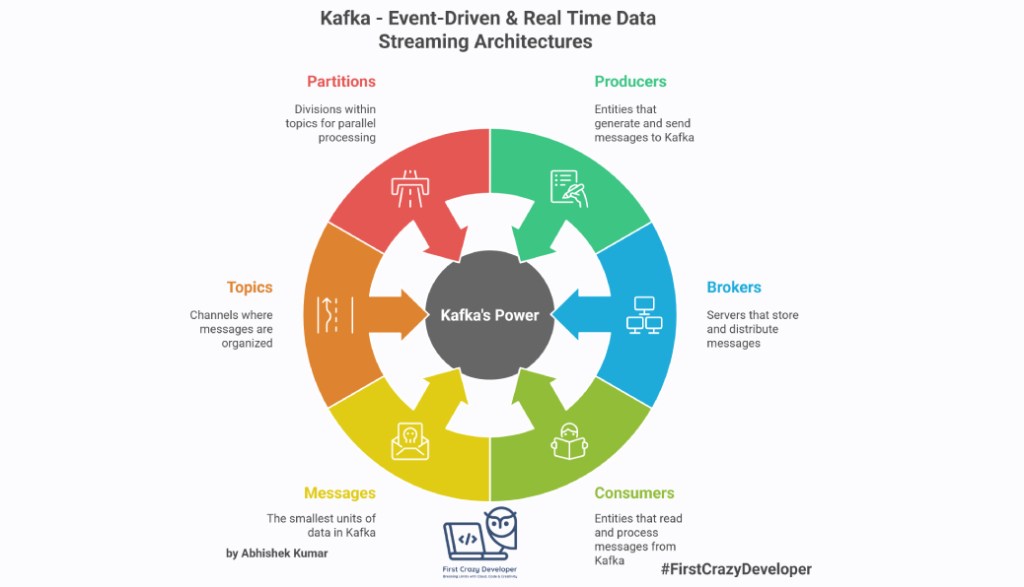
Apache Kafka is a distributed event streaming platform that powers some of the largest data-driven applications in the world. From Netflix’s recommendation engine to LinkedIn’s activity feed, Kafka has become the backbone of real-time data pipelines and event-driven architectures.
But what exactly makes Kafka so powerful? Let’s break it down step by step.
🔹 What is Kafka?
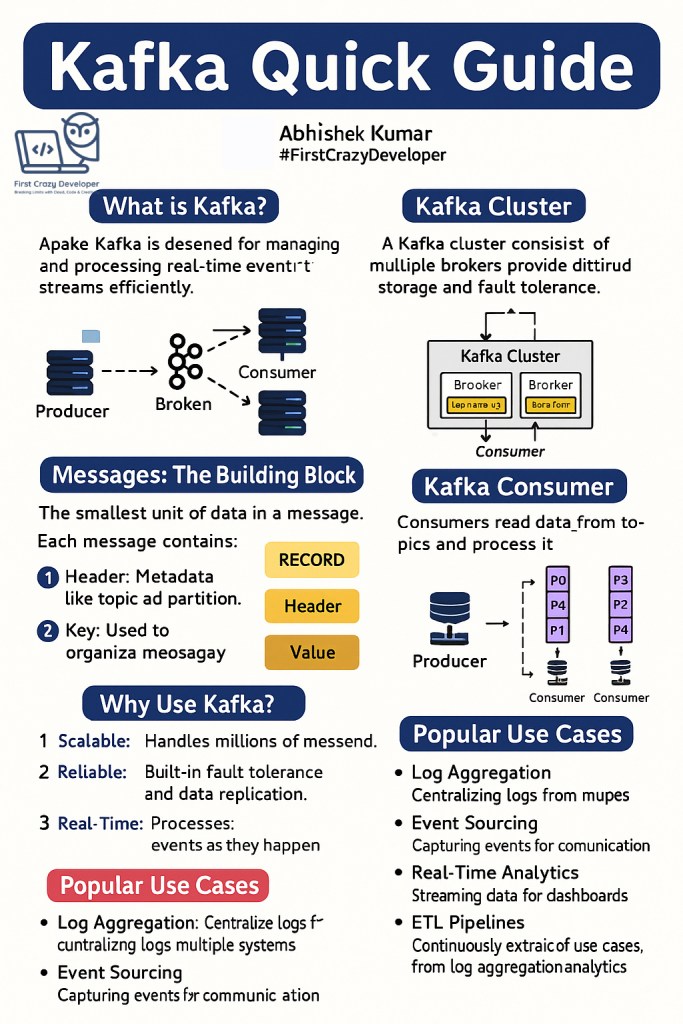
Kafka is designed for managing and processing real-time event streams efficiently.
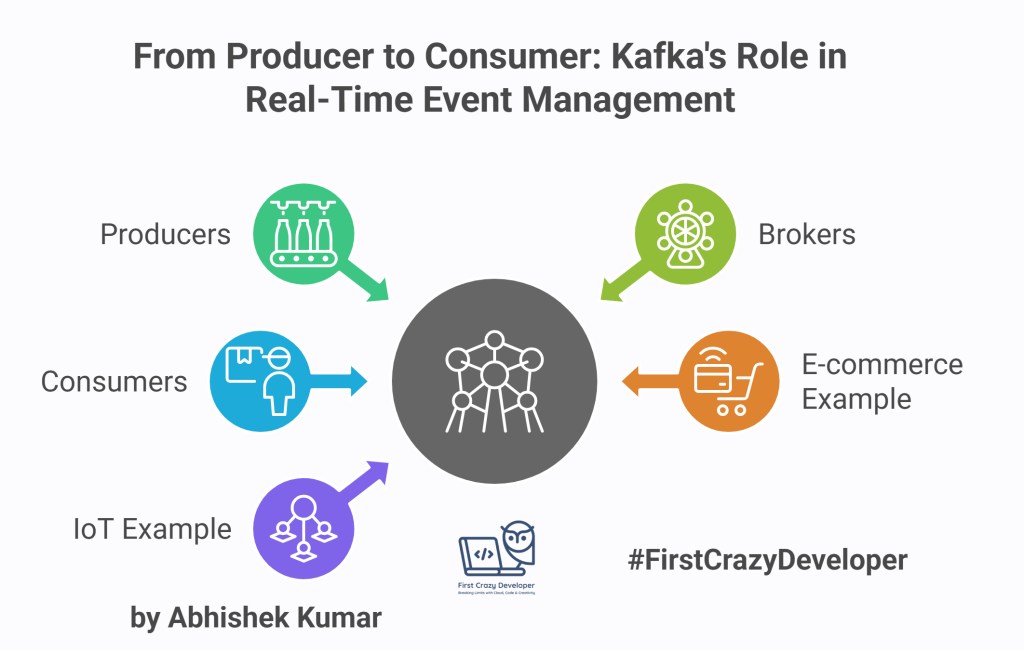
Think of it as a digital nervous system for your applications—where producers generate events, brokers distribute them, and consumers pick them up to take action.
For example:
- In e-commerce, when a customer places an order, Kafka can instantly notify the inventory system, payment gateway, and shipping service.
- In IoT, Kafka can stream millions of signals from connected devices for monitoring and analytics in real time.
🔹 Kafka Cluster
A Kafka cluster is made up of multiple brokers (servers). Each broker stores a portion of the data, ensuring scalability and fault tolerance.
- If one broker fails, another still has a copy of the data.
- Clusters allow Kafka to scale horizontally, handling millions of messages per second.
This is why companies like Uber and Spotify rely on Kafka clusters to handle global event streams without interruption.
🔹 Messages: The Building Block
In Kafka, the smallest unit of data is a message (also called a record). Each message has three parts:
- Header – Metadata like topic and partition information.
- Key – Used to group or order related messages.
- Value – The actual data payload (for example, a JSON log, a transaction event, or a sensor reading).
You can think of a message as a tiny envelope with an address (header), an identifier (key), and the actual letter (value).
🔹 Topics & Partitions
Messages are organized into topics. A topic is like a channel where producers publish data and consumers read from.
To handle massive scale, topics are split into partitions:
- Each partition can be read in parallel, enabling high throughput.
- Imagine a highway: the topic is the road, while partitions are the lanes. More lanes = faster traffic flow.
This partitioning allows multiple consumers to process data simultaneously, boosting scalability.
🔹 Kafka Producer
Producers are the writers in Kafka. They send messages to a topic.
- Producers can batch messages, improving performance and reducing network overhead.
- A partitioner decides which partition a message should go to (based on key or round-robin distribution).
Example:
In a banking app, the producer could be the transaction service that streams deposit and withdrawal events to Kafka.
🔹 Kafka Consumer
Consumers are the readers. They subscribe to topics and process messages.
- Kafka ensures reliable delivery — depending on configuration, messages can be delivered at-most-once, at-least-once, or exactly-once.
- Consumers can be grouped into consumer groups, which allows parallel data processing while maintaining load balance.
Example:
In a fraud detection system, multiple consumers can read transaction events simultaneously—one analyzing patterns, another updating dashboards, and another storing events in a data lake.

🔹 Why Use Kafka?
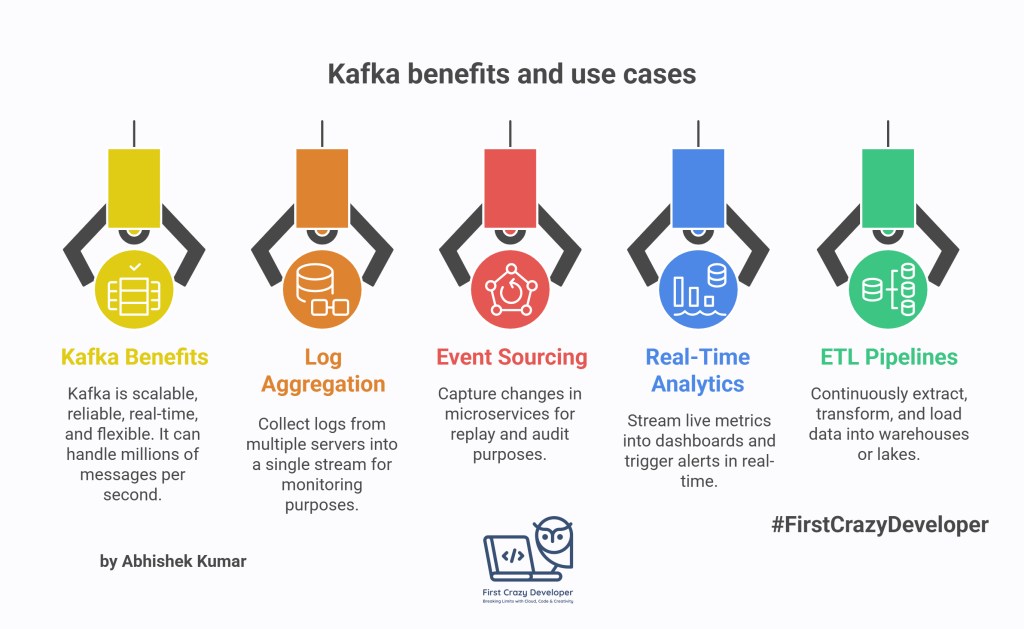
- Scalable – Kafka can handle millions of messages per second.
- Reliable – It has built-in replication and fault tolerance.
- Real-Time – Processes data as events happen, not in batches.
- Flexible – Fits a wide range of use cases: logs, metrics, analytics, IoT, event sourcing.
🔹 Popular Use Cases
- Log Aggregation – Collect logs from multiple servers into a single stream for monitoring.
- Event Sourcing – Capture changes in microservices for replay and audit.
- Real-Time Analytics – Stream live metrics into dashboards and trigger alerts.
- ETL Pipelines – Continuously extract, transform, and load data into warehouses or lakes.
🌟 Final Thoughts
Apache Kafka has evolved into the de facto standard for real-time data streaming. Its ability to scale effortlessly, deliver reliably, and integrate with modern data ecosystems makes it the first choice for building event-driven architectures.
Whether you’re working on IoT, financial systems, e-commerce, or AI-driven applications, Kafka provides the foundation to handle data at scale.
🔧 Setting up Kafka Producer in C# (.NET)
Here’s a clean, production-ready C#/.NET starter you can drop into your solution to publish and consume Kafka events in real time—covering batching, keys/partitioning, retries, idempotence, and safe offset commits.
1) NuGet packages
dotnet add package Confluent.Kafka --version 2.*
(Optionally for Avro/Schema Registry:)
dotnet add package Confluent.SchemaRegistry
dotnet add package Confluent.SchemaRegistry.Serdes
2) appsettings.json
{
  "Kafka": {
    "BootstrapServers": "localhost:9092",
    "Topic": "orders.v1",
    "DeadLetterTopic": "orders.dlq.v1",
    "ConsumerGroup": "orders-workers",
    "Security": {
      "UseSasl": false,
      "SaslMechanism": "PLAIN",
      "SaslUsername": "",
      "SaslPassword": "",
      "SaslProtocol": "SASL_SSL"
    }
  }
}
For Confluent Cloud/Azure-hosted Kafka, set
UseSasl=trueand fill credentials.
3) Producer (idempotent, batched, keyed)
Why this matters:
- Keyed messages keep order per key (e.g.,
OrderId) within a partition. - Idempotent producer +
acks=allguarantees no duplicates from retries. - Batching improves throughput.
using Confluent.Kafka;
using Microsoft.Extensions.Configuration;

public static class KafkaProducer
{
    public static IProducer<string, string> Build(IConfiguration cfg)
    {
        var kafka = cfg.GetSection("Kafka");
        var config = new ProducerConfig
        {
            BootstrapServers = kafka["BootstrapServers"],
            // Reliability
            EnableIdempotence = true, // dedupe on retries
            Acks = Acks.All,
            // Throughput (tune per workload)
            LingerMs = 5,             // small wait to coalesce messages
            BatchSize = 64_000,       // ~64KB batch
            CompressionType = CompressionType.Lz4,
            // Observability
            DeliveryReportFields = "all",
            // Timeouts
            MessageTimeoutMs = 30_000,
            SocketKeepaliveEnable = true
        };

        // SASL (if needed)
        if (bool.TryParse(kafka.GetSection("Security")["UseSasl"], out var useSasl) && useSasl)
        {
            config.SecurityProtocol = Enum.Parse<SecurityProtocol>(kafka.GetSection("Security")["SaslProtocol"]);
            config.SaslMechanism    = Enum.Parse<SaslMechanism>(kafka.GetSection("Security")["SaslMechanism"]);
            config.SaslUsername     = kafka.GetSection("Security")["SaslUsername"];
            config.SaslPassword     = kafka.GetSection("Security")["SaslPassword"];
        }

        return new ProducerBuilder<string, string>(config).Build();
    }

    public static async Task ProduceOrderAsync(
        IProducer<string, string> producer,
        string topic,
        OrderPlaced evt,
        CancellationToken ct = default)
    {
        // Use the orderId as key → stable partition, per-order ordering
        var key = evt.OrderId;
        var value = System.Text.Json.JsonSerializer.Serialize(evt);

        try
        {
            // fire-and-await for delivery confirmation
            var report = await producer.ProduceAsync(
                topic,
                new Message<string, string> { Key = key, Value = value },
                ct);

            Console.WriteLine($"✔ Sent to {report.TopicPartitionOffset} (key={key})");
        }
        catch (ProduceException<string, string> ex)
        {
            Console.Error.WriteLine($"✖ Produce failed: {ex.Error.Reason}");
            throw;
        }
    }
}

public record OrderPlaced(string OrderId, string CustomerId, decimal Amount, DateTime TimestampUtc);
Usage (e.g., from an API/controller or a console):
var config = new ConfigurationBuilder()
    .AddJsonFile("appsettings.json")
    .AddEnvironmentVariables()
    .Build();

var topic = config["Kafka:Topic"];
using var producer = KafkaProducer.Build(config);

// Simulate real-time events
for (int i = 1; i <= 5; i++)
{
    var evt = new OrderPlaced(
        OrderId: $"ORD-{i:D6}",
        CustomerId: $"CUST-{(i%3)+1}",
        Amount: 99.99m + i,
        TimestampUtc: DateTime.UtcNow);

    await KafkaProducer.ProduceOrderAsync(producer, topic, evt);
}
producer.Flush(TimeSpan.FromSeconds(5));
4) Consumer (safe processing + manual commit + DLQ)
Why this matters:
- Turn off
EnableAutoCommit→ commit offsets only after your processing succeeds. - On failure, publish to a DLQ (dead-letter topic) with headers for forensic debugging.
using Confluent.Kafka;
using Microsoft.Extensions.Configuration;
using System.Text.Json;

public class KafkaOrderWorker
{
    private readonly IConfiguration _cfg;
    private readonly string _topic;
    private readonly string _dlqTopic;
    private readonly string _groupId;

    public KafkaOrderWorker(IConfiguration cfg)
    {
        _cfg = cfg;
        _topic    = _cfg["Kafka:Topic"]!;
        _dlqTopic = _cfg["Kafka:DeadLetterTopic"]!;
        _groupId  = _cfg["Kafka:ConsumerGroup"]!;
    }

    public async Task RunAsync(CancellationToken ct)
    {
        var consumerConfig = new ConsumerConfig
        {
            BootstrapServers = _cfg["Kafka:BootstrapServers"],
            GroupId = _groupId,
            // Always start from the earliest if no committed offset
            AutoOffsetReset = AutoOffsetReset.Earliest,
            // Manual commit for "process-then-commit" semantics
            EnableAutoCommit = false,
            EnablePartitionEof = true,
            SessionTimeoutMs = 10_000,
            MaxPollIntervalMs = 300_000
        };

        using var consumer = new ConsumerBuilder<string, string>(consumerConfig).Build();
        using var dlqProducer = new ProducerBuilder<string, string>(
            new ProducerConfig { BootstrapServers = _cfg["Kafka:BootstrapServers"] }).Build();

        consumer.Subscribe(_topic);
        Console.WriteLine($"▶ Subscribed to {_topic} as group '{_groupId}'");

        try
        {
            while (!ct.IsCancellationRequested)
            {
                var cr = consumer.Consume(ct);
                if (cr.IsPartitionEOF) continue;

                try
                {
                    // 1) Deserialize and process
                    var evt = JsonSerializer.Deserialize<OrderPlaced>(cr.Message.Value)!;
                    await HandleOrderAsync(evt, ct);

                    // 2) Commit AFTER success (at-least-once)
                    consumer.Commit(cr);
                    Console.WriteLine($"✔ Processed {cr.TopicPartitionOffset} (key={cr.Message.Key})");
                }
                catch (Exception ex)
                {
                    Console.Error.WriteLine($"✖ Processing failed at {cr.TopicPartitionOffset}: {ex.Message}");

                    // 3) Ship to DLQ with metadata for investigation
                    var headers = new Headers
                    {
                        new Header("source-topic", System.Text.Encoding.UTF8.GetBytes(cr.Topic)),
                        new Header("source-partition", BitConverter.GetBytes(cr.Partition.Value)),
                        new Header("source-offset", BitConverter.GetBytes(cr.Offset.Value)),
                        new Header("error", System.Text.Encoding.UTF8.GetBytes(ex.ToString()))
                    };

                    await dlqProducer.ProduceAsync(_dlqTopic, new Message<string, string>
                    {
                        Key = cr.Message.Key,
                        Value = cr.Message.Value,
                        Headers = headers
                    });

                    // Decide: skip (don’t commit), or commit to avoid reprocessing loop.
                    // Here we commit to move on (operator can reprocess DLQ later).
                    consumer.Commit(cr);
                }
            }
        }
        catch (OperationCanceledException) { /* normal shutdown */ }
        finally
        {
            consumer.Close();
        }
    }

    private static Task HandleOrderAsync(OrderPlaced evt, CancellationToken _)
    {
        // Simulated business logic (db write, API call, etc.)
        Console.WriteLine($"→ Handling order {evt.OrderId} for {evt.CustomerId} amount {evt.Amount}");
        return Task.CompletedTask;
    }
}
Run the worker:
var cfg = new ConfigurationBuilder()
    .AddJsonFile("appsettings.json")
    .AddEnvironmentVariables()
    .Build();

var worker = new KafkaOrderWorker(cfg);
var cts = new CancellationTokenSource();
Console.CancelKeyPress += (_, e) => { e.Cancel = true; cts.Cancel(); };
await worker.RunAsync(cts.Token);
5) (Optional) Exactly-Once Stream Processing (EOS lite)
If you consume → process → produce to another topic and need transactional semantics (either both the output event and the offset commit succeed, or neither does), use a transactional producer:
var pCfg = new ProducerConfig {
    BootstrapServers = "...",
    EnableIdempotence = true,
    Acks = Acks.All,
    TransactionalId = "orders-pipeline-1" // unique per instance
};
using var txProducer = new ProducerBuilder<string, string>(pCfg).Build();
txProducer.InitTransactions();

txProducer.BeginTransaction();
// produce transformed/derived messages...
// then send the consumer group offsets as part of the transaction:
txProducer.SendOffsetsToTransaction(
    new[] { new TopicPartitionOffset(cr.TopicPartition, cr.Offset + 1) },
    new ConsumerGroupMetadata(groupId));
txProducer.CommitTransaction();
Use this pattern in a single “consume → transform → produce” service when you must avoid duplicates across topic boundaries.
6) Local Kafka for testing (Docker Compose)
# docker-compose.yml
version: '3.8'
services:
  zookeeper:
    image: confluentinc/cp-zookeeper:7.6.1
    environment:
      ZOOKEEPER_CLIENT_PORT: 2181
  broker:
    image: confluentinc/cp-kafka:7.6.1
    ports: ["9092:9092"]
    environment:
      KAFKA_BROKER_ID: 1
      KAFKA_ZOOKEEPER_CONNECT: zookeeper:2181
      KAFKA_LISTENERS: PLAINTEXT://0.0.0.0:9092
      KAFKA_ADVERTISED_LISTENERS: PLAINTEXT://localhost:9092
      KAFKA_OFFSETS_TOPIC_REPLICATION_FACTOR: 1
Start:
docker compose up -d
Create topic (CLI):
docker exec -it $(docker ps --filter "ancestor=confluentinc/cp-kafka" -q) \
kafka-topics --create --topic orders.v1 --bootstrap-server localhost:9092 --partitions 6 --replication-factor 1
docker exec -it $(docker ps --filter "ancestor=confluentinc/cp-kafka" -q) \
kafka-topics --create --topic orders.dlq.v1 --bootstrap-server localhost:9092 --partitions 6 --replication-factor 1
ASP.NET Core + BackgroundService sample that uses the producer/consumer code we wrote, plus a PowerShell script to provision topics (local Docker Kafka) and a quick alternative for Confluent Cloud.
✅ Project layout
KafkaDemo/
├─ src/
│  ├─ KafkaDemo.Api/
│  │  ├─ Controllers/ProducerController.cs
│  │  ├─ Services/KafkaProducer.cs          (from previous message)
│  │  ├─ Services/KafkaOrderWorker.cs       (from previous message)
│  │  ├─ Models/OrderPlaced.cs              (record type)
│  │  ├─ appsettings.json
│  │  └─ Program.cs
└─ infra/
   ├─ docker-compose.yml
   └─ provision-topics.ps1
src/KafkaDemo.Api/appsettings.json
{
  "Kafka": {
    "BootstrapServers": "localhost:9092",
    "Topic": "orders.v1",
    "DeadLetterTopic": "orders.dlq.v1",
    "ConsumerGroup": "orders-workers",
    "Security": {
      "UseSasl": false,
      "SaslMechanism": "PLAIN",
      "SaslUsername": "",
      "SaslPassword": "",
      "SaslProtocol": "SASL_SSL"
    }
  },
  "Logging": {
    "LogLevel": { "Default": "Information", "Microsoft.AspNetCore": "Warning" }
  },
  "AllowedHosts": "*"
}
For Confluent Cloud/Azure-hosted Kafka: set
UseSasl: trueand fill credentials.
src/KafkaDemo.Api/Models/OrderPlaced.cs
namespace KafkaDemo.Api.Models;

public record OrderPlaced(
    string OrderId,
    string CustomerId,
    decimal Amount,
    DateTime TimestampUtc);
src/KafkaDemo.Api/Services/KafkaProducer.cs
Use the exact producer implementation I gave earlier (idempotent, batching, SASL support).
Namespace suggestion:KafkaDemo.Api.Services.
src/KafkaDemo.Api/Services/KafkaOrderWorker.cs
Use the exact consumer/worker implementation I gave earlier
Namespace suggestion:KafkaDemo.Api.Services.
src/KafkaDemo.Api/Controllers/ProducerController.cs
using Confluent.Kafka;
using KafkaDemo.Api.Models;
using KafkaDemo.Api.Services;
using Microsoft.AspNetCore.Mvc;
using Microsoft.Extensions.Configuration;

namespace KafkaDemo.Api.Controllers;

[ApiController]
[Route("api/orders")]
public class ProducerController : ControllerBase
{
    private readonly IProducer<string, string> _producer;
    private readonly string _topic;

    public ProducerController(IProducer<string, string> producer, IConfiguration cfg)
    {
        _producer = producer;
        _topic = cfg["Kafka:Topic"]!;
    }

    // POST /api/orders
    [HttpPost]
    public async Task<IActionResult> Publish([FromBody] OrderPlaced dto, CancellationToken ct)
    {
        await KafkaProducer.ProduceOrderAsync(_producer, _topic, dto, ct);
        return Accepted(new { dto.OrderId, Topic = _topic });
    }

    // Simple health ping
    [HttpGet("ping")]
    public IActionResult Ping() => Ok("pong");
}
src/KafkaDemo.Api/Program.cs
using Confluent.Kafka;
using KafkaDemo.Api.Services;

var builder = WebApplication.CreateBuilder(args);

// Configuration is already loaded from appsettings.json + env

// Controllers
builder.Services.AddControllers();

// Kafka Producer as a singleton
builder.Services.AddSingleton<IProducer<string, string>>(sp =>
{
    var cfg = sp.GetRequiredService<IConfiguration>();
    return KafkaProducer.Build(cfg);
});

// Background consumer worker
builder.Services.AddHostedService<KafkaOrderWorker>();

// Swagger (optional)
builder.Services.AddEndpointsApiExplorer();
builder.Services.AddSwaggerGen();

var app = builder.Build();

app.UseRouting();
app.UseAuthorization();

app.MapControllers();

if (app.Environment.IsDevelopment())
{
    app.UseSwagger();
    app.UseSwaggerUI();
}

app.Run();
infra/docker-compose.yml (local Kafka)
version: '3.8'
services:
  zookeeper:
    image: confluentinc/cp-zookeeper:7.6.1
    environment:
      ZOOKEEPER_CLIENT_PORT: 2181
    ports: ["2181:2181"]

  broker:
    image: confluentinc/cp-kafka:7.6.1
    depends_on: [zookeeper]
    ports: ["9092:9092"]
    environment:
      KAFKA_BROKER_ID: 1
      KAFKA_ZOOKEEPER_CONNECT: zookeeper:2181
      KAFKA_LISTENERS: PLAINTEXT://0.0.0.0:9092
      KAFKA_ADVERTISED_LISTENERS: PLAINTEXT://localhost:9092
      KAFKA_OFFSETS_TOPIC_REPLICATION_FACTOR: 1
infra/provision-topics.ps1 (PowerShell)
This script:
- Starts Docker Compose (if not already running).
- Waits for the broker.
- Creates primary and DLQ topics with your chosen partition count.
- Describes topics for verification.
param(
  [string] $ComposeDir = "$PSScriptRoot",
  [string] $Topic = "orders.v1",
  [string] $DlqTopic = "orders.dlq.v1",
  [int] $Partitions = 6,
  [int] $Replication = 1
)

Write-Host "▶ Starting Kafka stack via docker compose..." -ForegroundColor Cyan
docker compose -f "$ComposeDir\docker-compose.yml" up -d | Out-Null

# Helper to get broker container id
function Get-BrokerId {
  docker ps --filter "ancestor=confluentinc/cp-kafka:7.6.1" --format "{{.ID}}"
}

# Wait for broker port 9092
Write-Host "⏳ Waiting for Kafka broker on localhost:9092..."
$max = 60
for ($i=0; $i -lt $max; $i++) {
  try { (New-Object Net.Sockets.TcpClient).Connect("localhost",9092); break }
  catch { Start-Sleep -Seconds 2 }
}

$brokerId = Get-BrokerId
if (-not $brokerId) { throw "Kafka broker container not found." }

function Ensure-Topic($name) {
  Write-Host "→ Creating topic '$name' (partitions=$Partitions, rf=$Replication)..."
  docker exec -it $brokerId kafka-topics \
    --bootstrap-server localhost:9092 \
    --create --if-not-exists \
    --topic $name \
    --partitions $Partitions \
    --replication-factor $Replication
}

Ensure-Topic $Topic
Ensure-Topic $DlqTopic

Write-Host "`n🔎 Describing topics..."
docker exec -it $brokerId kafka-topics --bootstrap-server localhost:9092 --describe --topic $Topic
docker exec -it $brokerId kafka-topics --bootstrap-server localhost:9092 --describe --topic $DlqTopic

Write-Host "`n✅ Topics ready."
Run it:
cd .\infra
.\provision-topics.ps1 -Partitions 6 -Replication 1
How to run the whole sample
# 1) Start local Kafka and create topics
pwsh -File infra/provision-topics.ps1

# 2) Restore & run the API + worker
cd src/KafkaDemo.Api
dotnet restore
dotnet run
Test produce (HTTP):
curl -X POST http://localhost:5000/api/orders `
  -H "Content-Type: application/json" `
  -d "{\"OrderId\":\"ORD-000001\",\"CustomerId\":\"CUST-1\",\"Amount\":129.5,\"TimestampUtc\":\"$(Get-Date -AsUTC -Format o)\"}"
Your background KafkaOrderWorker will consume, process, and commit offsets. Failures are sent to the DLQ with rich headers.
Confluent Cloud variant (optional)
- In
appsettings.jsonset:
"BootstrapServers": "<your-cluster-url>:9092",
"Security": {
  "UseSasl": true,
  "SaslMechanism": "PLAIN",
  "SaslUsername": "<API_KEY>",
  "SaslPassword": "<API_SECRET>",
  "SaslProtocol": "SASL_SSL"
}
- Create topics via Confluent Cloud UI or CLI:
confluent kafka topic create orders.v1 --partitions 12
confluent kafka topic create orders.dlq.v1 --partitions 12
Quick checklist (best practices)
- Use message keys to preserve per-entity ordering (e.g.,
OrderId). - Turn on idempotent producer and acks=all.
- Tune linger/batch/compression for throughput.
- Disable auto-commit; commit offsets after success.
- Add a DLQ with rich headers for failures.
- Prefer multiple small partitions to scale consumer groups horizontally.
- For “consume-transform-produce” pipelines needing atomicity, use transactions.
Production tips (quick)
- Use 12–48 partitions for high-throughput topics; scale consumer group size accordingly.
- Turn on idempotence, acks=all, compression (LZ4/Zstd).
- Disable auto-commit, commit after success; use DLQ on failure.
- Add OpenTelemetry for end-to-end tracing across producer/consumer.
- In Kubernetes, prefer static configs via ConfigMaps/Secrets; use liveness/readiness probes for the worker.
💡 Abhishek Take:
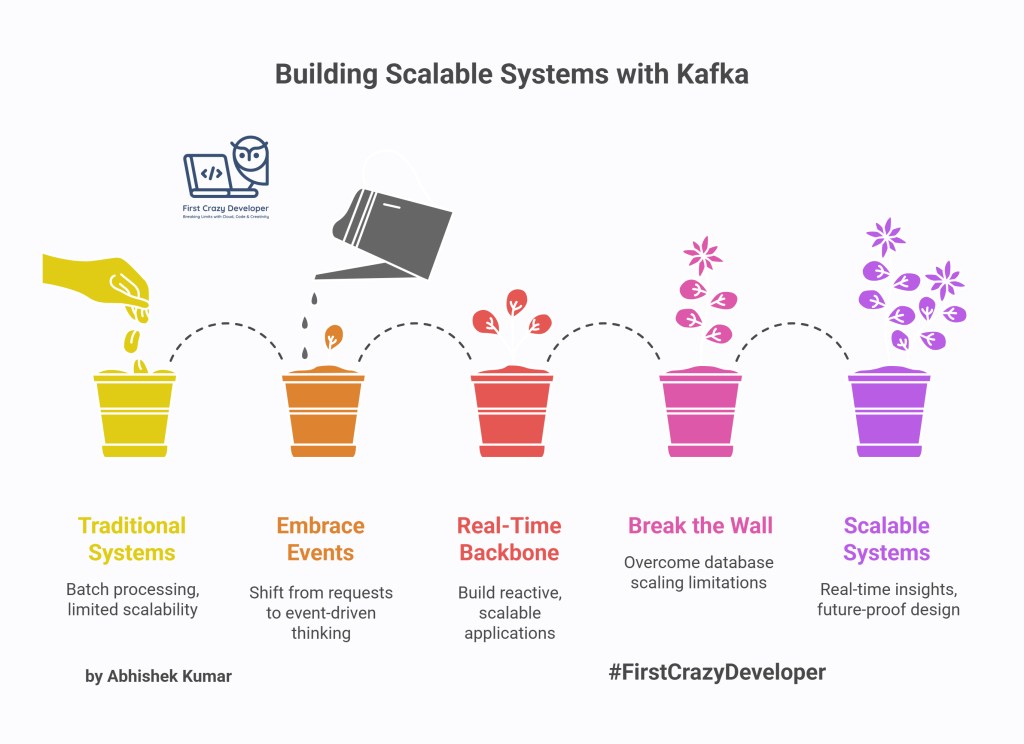
Scalable systems aren’t built with wishful thinking — they’re designed with the right foundations. Kafka is more than a queue; it’s an architectural shift. It forces you to think in events, not requests. And that shift unlocks designs that are resilient, cost-efficient, and future-proof. As an architect, embracing Kafka isn’t optional anymore — it’s survival.
Kafka isn’t just about moving data from point A to B — it’s about rethinking how systems talk to each other. In a world where real time is the new default, Kafka gives you the backbone to build applications that don’t just react, but predict, scale, and evolve. If you’re still batch-processing, you’re already one step behind.
Every developer hits that wall where traditional databases or APIs just can’t keep up with scale. Kafka breaks that wall. It lets you build systems that breathe in events and exhale insights — instantly. Once you’ve built your first streaming app, you’ll wonder how you ever shipped software without Kafka in your toolbox.
👉 What’s your experience with Kafka? Have you implemented it in your projects? Share your thoughts—I’d love to hear your insights!
#Kafka #EventStreaming #ApacheKafka #DotNet #CSharp #RealTimeData #Microservices #EventDrivenArchitecture #CloudNative #FirstCrazyDeveloper
 First Crazy Developer
Leave a comment