
✍️ By Abhishek Kumar | #FirstCrazyDeveloper
Artificial Intelligence has rapidly evolved over the last decade, and Large Language Models (LLMs) have become the core drivers of this revolution. From OpenAI’s GPT family to Meta’s LLaMA, Anthropic’s Claude, Google’s Gemini, and more — each ecosystem brings unique capabilities tailored for developers, researchers, and enterprises.
In this blog, we’ll break down the leading AI language models in today’s market, show real-world use cases, and demonstrate hands-on code to integrate them into applications.
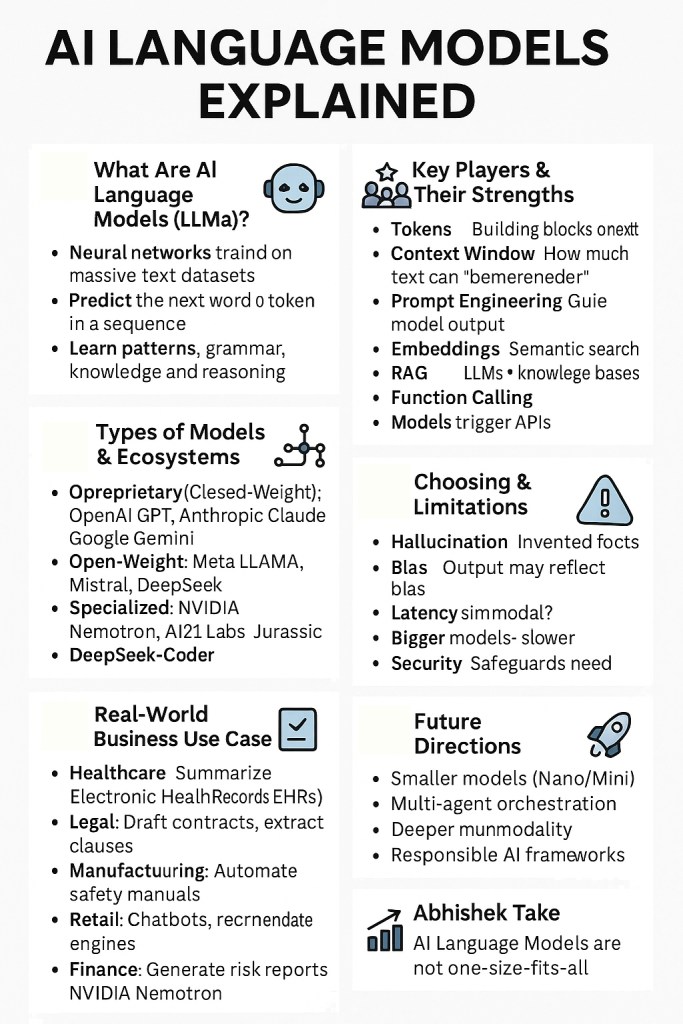
🔹What Are AI Language Models (LLMs)?
- LLMs are neural networks trained on massive text datasets.
- They predict the next word or token in a sequence, which enables them to generate text, code, summaries, and more.
- They learn patterns, grammar, knowledge, and reasoning from billions of documents.
🔹Why Are They Important?
- Automation: Reduce manual effort (e.g., compliance checks, summarization).
- Scalability: Handle millions of requests with consistent quality.
- Adaptability: Can be fine-tuned or prompted for domain-specific tasks.
- Multimodality: Some models (e.g., Gemini, GPT-4o) understand text + images + code.
🔹Types of Models & Ecosystems
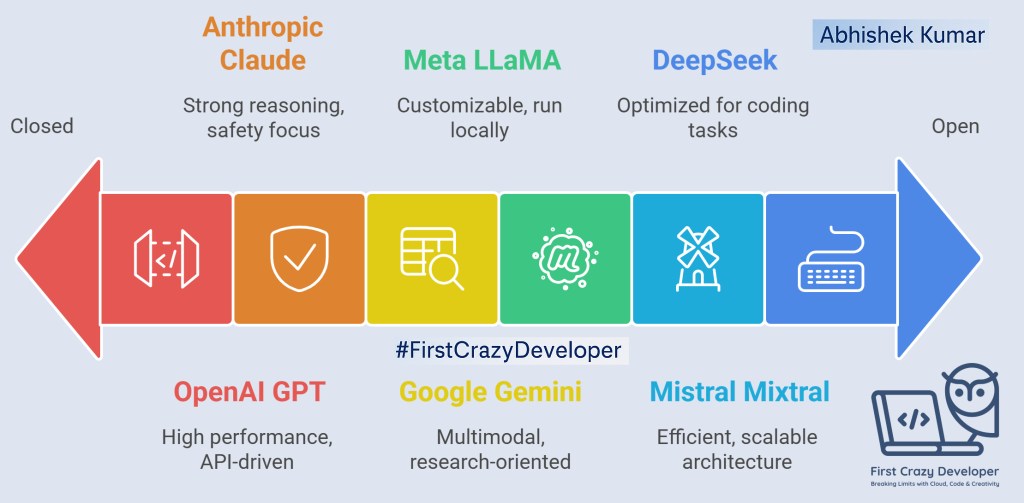
- Proprietary (Closed-Weight): OpenAI GPT, Anthropic Claude, Google Gemini → high performance, API-driven.
- Open-Weight: Meta LLaMA, Mistral, DeepSeek → downloadable, customizable, run locally or on private cloud.
- Specialized: NVIDIA Nemotron (synthetic data), AI21 Labs Jurassic (text generation), DeepSeek-Coder (coding).
🔹 Key Players & Their Strengths
- OpenAI (GPT): Best for general-purpose, enterprise-ready apps.
- Anthropic (Claude): Strong on reasoning + safety (useful in compliance).
- Google (Gemini): Multimodal, great for research & analytics.
- Meta (LLaMA): Open-weight, fine-tune-friendly.
- Mistral (Mixtral): Efficient, mixture-of-experts for scale.
- DeepSeek: Optimized for coding & developer tools.
- NVIDIA (Nemotron): Data generation & model training.
- AI21 Labs (Jurassic): Text-heavy apps like summarization.
🔹Core Concepts Developers Must Know
- Tokens: The building blocks of LLM text (words broken into chunks).
- Context Window: How much text a model can “remember” at once.
- Prompt Engineering: Crafting input instructions to guide model output.
- Embeddings: Converting text into vectors for semantic search (RAG).
- RAG (Retrieval-Augmented Generation): Combine LLMs with knowledge bases for fact-checked responses.
- Function Calling / Tool Use: Models can trigger external APIs for actions.
- Fine-Tuning / LoRA: Training models on custom datasets to specialize them.
🔹Real-World Business Use Cases
- Healthcare: Summarize Electronic Health Records (EHRs) for faster diagnosis.
- Legal: Draft contracts, extract clauses, ensure compliance.
- Manufacturing: Automate safety manuals & incident reporting.
- Retail: Chatbots for product queries, recommendation engines.
- Finance: Generate risk reports, detect fraud patterns.
🔹Choosing the Right Model (Decision Guide)
- ✅ Need enterprise reliability? → OpenAI GPT-4.1 or Claude.
- ✅ Want to run privately? → LLaMA, Mistral, DeepSeek.
- ✅ Require multimodal (image+text)? → Gemini 2.5 or GPT-4o.
- ✅ Coding AI assistant? → DeepSeek-Coder or GPT-4.1.
- ✅ Synthetic data generation? → NVIDIA Nemotron.
🔹 Challenges & Limitations
- Hallucination: Models can invent facts.
- Bias: Output may reflect training data bias.
- Cost: Large models = expensive inference.
- Latency: Bigger models may respond slower.
- Security: Need safeguards to prevent leaking sensitive info.

🔹Future Directions
- Smaller, efficient models (Nano/Mini) for real-time apps.
- Multi-agent orchestration (models collaborating like a team).
- Deeper multimodality (text + video + audio + IoT signals).
- Responsible AI frameworks (safety, compliance, transparency).
📌 The Landscape of AI Models
Here’s a quick overview of popular LLM providers and their flagship models:
🔹 OpenAI
- GPT-4.1 (Nano, Mini, Standard)
- GPT-40 (Standard, Mini)
- GPT-3.5 / GPT-3.5 Mini
- GPT-4.0 Mini
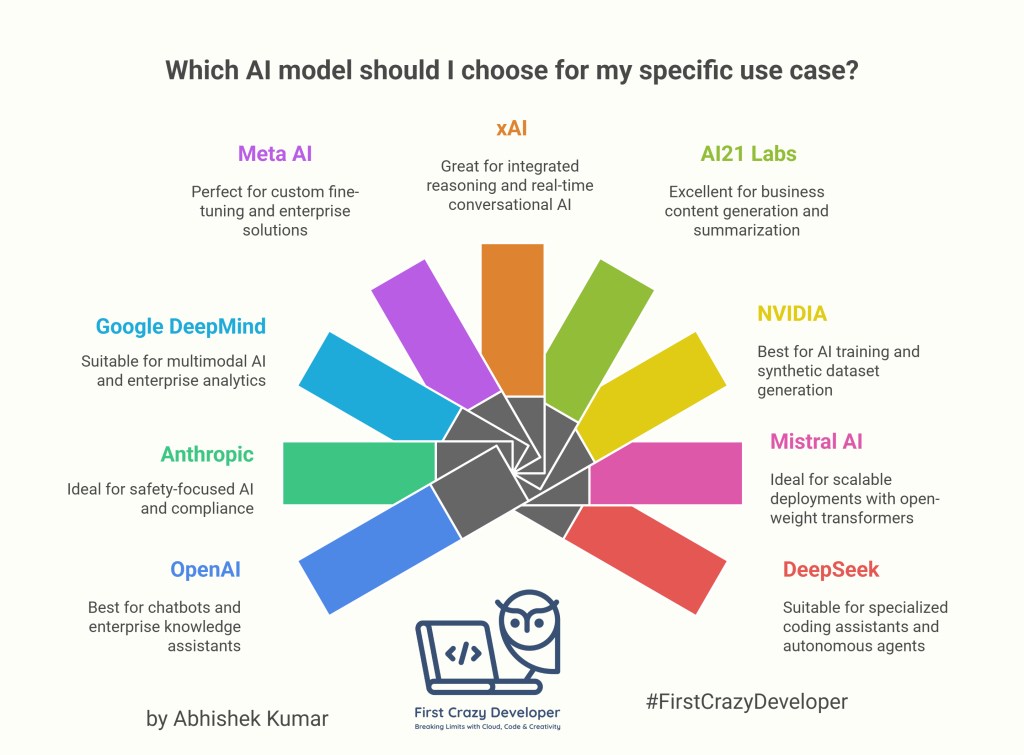
👉 Use Case: Chatbots, enterprise knowledge assistants, AI copilots.
🔹 Anthropic
- Claude 3.7 Sonnet
- Claude 3.5 Sonnet
- Claude 3 Opus
- Claude 3 Haiku
👉 Use Case: Safety-focused AI for corporate knowledge, compliance, and reasoning-heavy tasks.
🔹 Google DeepMind
- Gemini 2.5 Pro
- Gemini 2.5 Flash
- Gemini 2.0 Pro
- Gemini 2.0 Flash
👉 Use Case: Multimodal AI (text, vision, code), enterprise analytics, advanced R&D.
🔹 Meta AI
- LLaMA 4 (Behemoth, Maverick, Scout)
- LLaMA 3
👉 Use Case: Open-weight models for custom fine-tuning and enterprise AI solutions.
🔹 xAI
- Grok-4
👉 Use Case: Integrated reasoning, conversational AI for real-time use cases.
🔹 AI21 Labs
- Jurassic-2 Ultra
- Jurassic-2 Mid
- Jurassic-2 Light
👉 Use Case: Business content generation, summarization, and knowledge graphing.
🔹 NVIDIA
- Nemotron-4
👉 Use Case: AI training, synthetic dataset generation, industry-grade LLM development.
🔹 Mistral AI
- Mixtral 8x22B
- Mixtral 8x7B
👉 Use Case: Open-weight transformer experts (MoE) for scalable deployments.
🔹 DeepSeek
- Janus-Pro
- DeepSeek-R1
- DeepSeek-Coder V2
- DeepSeek-V2 / V3
👉 Use Case: Specialized coding assistants, autonomous agents.
🌍 Real-World Example: Regulatory Compliance Assistant
Imagine a global chemical company that needs to ensure regulatory compliance labels for thousands of products. Manually updating and validating legal documents is error-prone. Using LLMs, the company can:
- Ingest regulatory documents into a vector database.
- Use embeddings (OpenAI GPT-4o or Gemini) to semantically search compliance rules.
- Query with Anthropic’s Claude for safe reasoning and explanation.
- Generate compliance reports automatically.
This hybrid approach ensures accuracy, explainability, and speed.
💻 Hands-On Code Examples
🔹 Example: Using OpenAI GPT-4.1 (Python)
from openai import OpenAI

client = OpenAI(api_key="your_api_key")

response = client.chat.completions.create(
    model="gpt-4.1",
    messages=[
        {"role": "system", "content": "You are a compliance assistant."},
        {"role": "user", "content": "Summarize EU chemical labeling regulations for paint products."}
    ]
)

print(response.choices[0].message["content"])
🔹 Example: Using Meta’s LLaMA (C# via Hugging Face Transformers)
using System;
using HuggingFace.Hub;
using Transformers;

class Program
{
    static async Task Main(string[] args)
    {
        var repo = "meta-llama/Llama-3-8B-Instruct";
        var model = await Transformers.AutoModelForCausalLM.FromPretrainedAsync(repo);
        var tokenizer = await Transformers.AutoTokenizer.FromPretrainedAsync(repo);

        var input = tokenizer.Encode("Explain chemical safety regulations for packaging.");
        var output = model.Generate(input, max_new_tokens: 200);

        Console.WriteLine(tokenizer.Decode(output[0]));
    }
}
🔹 Example: Google Gemini for Multimodal Queries (Python)
import google.generativeai as genai

genai.configure(api_key="your_api_key")
model = genai.GenerativeModel("gemini-1.5-pro")

response = model.generate_content([
    "Summarize compliance rules from this document.",
    {"mime_type": "application/pdf", "data": open("regulation.pdf", "rb").read()}
])

print(response.text)
🧠 Structured Data Extraction (JSON) from Unstructured Text
Use when you must pull fields from emails, contracts, tickets, etc.
🔹Python — OpenAI (GPT-4.1 / GPT-4o)
import os, json
from openai import OpenAI

client = OpenAI(api_key=os.getenv("OPENAI_API_KEY"))

schema = {
  "type": "object",
  "properties": {
    "customer_name": {"type": "string"},
    "order_id": {"type": "string"},
    "total_amount": {"type": "number"},
    "currency": {"type": "string"},
    "due_date": {"type": "string", "format": "date"},
    "items": {
      "type": "array",
      "items": {
        "type": "object",
        "properties": {"sku": {"type":"string"}, "qty":{"type":"integer"}, "price":{"type":"number"}},
        "required": ["sku","qty","price"]
      }
    }
  },
  "required": ["customer_name","order_id","total_amount","currency"]
}

text = open("invoice_email.txt","r",encoding="utf-8").read()

resp = client.chat.completions.create(
  model="gpt-4.1",
  messages=[{"role":"system","content":"Extract fields as valid JSON ONLY."},
            {"role":"user","content":text}],
  response_format={"type":"json_schema","json_schema":{"name":"Invoice","schema":schema}}
)

data = json.loads(resp.choices[0].message.content)
print("Parsed:", data)
🔹C# — OpenAI (Structured Output)
using System.Text.Json;
using OpenAI;

var client = new OpenAIClient(environment: OpenAIClientEnvironment.Azure, apiKey: Environment.GetEnvironmentVariable("OPENAI_API_KEY"));
// If using OpenAI (non-Azure), just new OpenAIClient(apiKey: ...)

var schema = new {
  type="object",
  properties=new {
    customer_name=new { type="string" },
    order_id=new { type="string" },
    total_amount=new { type="number" },
    currency=new { type="string" },
    due_date=new { type="string", format="date"},
    items=new { type="array", items=new {
      type="object",
      properties=new { sku=new {type="string"}, qty=new {type="integer"}, price=new {type="number"} },
      required=new[] {"sku","qty","price"}
    }}
  },
  required=new[] {"customer_name","order_id","total_amount","currency"}
};

var text = File.ReadAllText("invoice_email.txt");

var result = await client.ChatCompletion.CreateAsync(new() {
  Model="gpt-4.1",
  Messages = [
    new("system","Extract fields as valid JSON ONLY."),
    new("user", text)
  ],
  ResponseFormat = new() {
    Type = "json_schema",
    JsonSchema = new() { Name="Invoice", Schema = JsonSerializer.SerializeToElement(schema) }
  }
});

var obj = JsonSerializer.Deserialize<JsonElement>(result.Choices[0].Message.Content);
Console.WriteLine(obj);
🧠 RAG on Company Docs (Azure Cognitive Search + Azure OpenAI)
Use for policy Q&A, compliance guidance, SOP assistants.
🔹Python — Index, Embed, Ask
import os, json, requests
from azure.core.credentials import AzureKeyCredential
from azure.search.documents import SearchClient
from azure.search.documents.indexes import SearchIndexClient
from azure.search.documents.indexes.models import SearchIndex, SimpleField, VectorSearch, HnswAlgorithmConfiguration, VectorSearchProfile, SearchFieldDataType, SearchField
from openai import AzureOpenAI

# --- Config
ACS_ENDPOINT   = os.getenv("ACS_ENDPOINT")
ACS_KEY        = os.getenv("ACS_KEY")
INDEX_NAME     = "docs"
AOAI_ENDPOINT  = os.getenv("AOAI_ENDPOINT")
AOAI_KEY       = os.getenv("AOAI_KEY")
EMBED_MODEL    = "text-embedding-3-large"   # or "text-embedding-ada-002"
CHAT_MODEL     = "gpt-4o"

# --- Build index (run once)
index_client = SearchIndexClient(ACS_ENDPOINT, AzureKeyCredential(ACS_KEY))
fields = [
  SimpleField(name="id", type=SearchFieldDataType.String, key=True, filterable=True),
  SearchField(name="content", type=SearchFieldDataType.String),
  SearchField(name="file", type=SearchFieldDataType.String, filterable=True),
  SearchField(name="vec", type=SearchFieldDataType.Collection(SearchFieldDataType.Single),
              vector_search_dimensions=3072, vector_search_profile_name="vprofile")
]
vsearch = VectorSearch(
  algorithms=[HnswAlgorithmConfiguration(name="hnsw")],
  profiles=[VectorSearchProfile(name="vprofile", algorithm_configuration_name="hnsw")]
)
try:
  index_client.create_index(SearchIndex(name=INDEX_NAME, fields=fields, vector_search=vsearch))
except Exception:
  pass

# --- Embed & upsert
aoai = AzureOpenAI(azure_endpoint=AOAI_ENDPOINT, api_key=AOAI_KEY, api_version="2024-06-01")
def embed(text: str):
  vec = aoai.embeddings.create(model=EMBED_MODEL, input=text).data[0].embedding
  return vec

search_client = SearchClient(ACS_ENDPOINT, INDEX_NAME, AzureKeyCredential(ACS_KEY))
docs = [{"id":"1","content":open("HR_Policy.txt").read(),"file":"HR_Policy.txt"}]
for d in docs:
  d["vec"] = embed(d["content"])
search_client.upload_documents(docs)

# --- Hybrid search + answer
question = "What is the maternity leave policy and required notice period?"
qvec = embed(question)
results = search_client.search(search_text=question,
                               vectors=[{"value": qvec, "fields": "vec", "k": 5}],
                               top=5)
context = "\n\n".join([r["content"] for r in results])
prompt = f"Use ONLY the context to answer:\n\n{context}\n\nQ: {question}\nA:"

ans = aoai.chat.completions.create(
  model=CHAT_MODEL,
  messages=[{"role":"system","content":"Be precise, cite filenames."},
            {"role":"user","content":prompt}]
)
print(ans.choices[0].message.content)
🔹C# — Ask over ACS results
using Azure;
using Azure.AI.OpenAI;
using Azure.Search.Documents;
using Azure.Search.Documents.Models;

var acs = new SearchClient(new Uri(Environment.GetEnvironmentVariable("ACS_ENDPOINT")!),
                           "docs",
                           new AzureKeyCredential(Environment.GetEnvironmentVariable("ACS_KEY")!));
var aoai = new OpenAIClient(new Uri(Environment.GetEnvironmentVariable("AOAI_ENDPOINT")!),
                            new AzureKeyCredential(Environment.GetEnvironmentVariable("AOAI_KEY")!));

var question = "Summarize data retention in IT policy.";
// Assume vectors already stored as "vec". Do hybrid keyword + vector; SDKs vary—using keyword here for brevity.
var hits = acs.Search<SearchDocument>(question, new SearchOptions { Size = 5 });

var context = string.Join("\n---\n", hits.GetResults().Select(r => (string)r.Document["content"]));
var chat = await aoai.GetChatCompletionsAsync("gpt-4o", new ChatCompletionsOptions {
    Messages = {
        new ChatRequestSystemMessage("Answer strictly from context and cite file names."),
        new ChatRequestUserMessage($"Context:\n{context}\n\nQ: {question}\nA:")
    }
});
Console.WriteLine(chat.Value.Choices[0].Message.Content[0].Text);
🧠 Multimodal Invoice Understanding (Image → JSON)
Use for AP automation—extract totals, vendor, due dates directly from images or PDFs.
🔹 Python — Gemini 2.5 Pro
import os, base64, google.generativeai as genai

genai.configure(api_key=os.getenv("GEMINI_API_KEY"))
model = genai.GenerativeModel("gemini-2.5-pro")

img_bytes = open("invoice.jpg","rb").read()
prompt = """Extract a JSON with fields: vendor, invoice_number, date, subtotal, tax, total, currency, items[]."""

resp = model.generate_content([prompt, {"mime_type":"image/jpeg","data": img_bytes}],
                              generation_config={"response_mime_type":"application/json"})
print(resp.text)  # JSON
🔹C# — Azure OpenAI GPT-4o (Vision)
using Azure;
using Azure.AI.OpenAI;

var client = new OpenAIClient(new Uri(Environment.GetEnvironmentVariable("AOAI_ENDPOINT")!),
                              new AzureKeyCredential(Environment.GetEnvironmentVariable("AOAI_KEY")!));

var imageBytes = await File.ReadAllBytesAsync("invoice.jpg");
var base64 = Convert.ToBase64String(imageBytes);

var messages = new List<ChatMessage>
{
  new ChatMessage(ChatRole.System, "Return ONLY JSON."),
  new ChatMessage(ChatRole.User, new List<ChatMessageContentItem>
  {
    new ChatMessageTextContentItem("Extract fields: vendor, invoice_number, date, subtotal, tax, total, currency, items[]."),
    new ChatMessageImageContentItem(new Uri($"data:image/jpeg;base64,{base64}"))
  })
};

var result = await client.GetChatCompletionsAsync("gpt-4o", new ChatCompletionsOptions { Messages = { messages }});
Console.WriteLine(result.Value.Choices[0].Message.Content[0].Text);
🧠 Function Calling (Tool-Use) for Line-of-Business Apps
Use when the model must decide to call your internal APIs (inventory, pricing, create ticket, etc.).
🔹Python — OpenAI Tools
from openai import OpenAI; import os, json, math
client = OpenAI(api_key=os.getenv("OPENAI_API_KEY"))

def get_price(sku:str, qty:int)->dict:
    price = 19.99 if sku.startswith("PAINT") else 9.99
    return {"sku": sku, "qty": qty, "unit_price": price, "total": round(price*qty,2)}

tools=[{
 "type":"function",
 "function":{
  "name":"get_price",
  "description":"Get price for a SKU and qty",
  "parameters":{"type":"object","properties":{"sku":{"type":"string"}, "qty":{"type":"integer"}}, "required":["sku","qty"]}
 }}]

msg=[{"role":"user","content":"Customer wants 12 units of PAINT-INT-300. What's the total? Quote it."}]
res=client.chat.completions.create(model="gpt-4.1", messages=msg, tools=tools)
call=res.choices[0].message.tool_calls
if call:
    args=json.loads(call[0].function.arguments)
    result=get_price(**args)
    msg += [res.choices[0].message, {"role":"tool","tool_call_id":call[0].id,"name":"get_price","content":json.dumps(result)}]
    final=client.chat.completions.create(model="gpt-4.1", messages=msg)
    print(final.choices[0].message.content)
🔹C# — Tool Calling (pseudo via function messages)
// Outline for handling tool calls; actual SDK signatures vary by version.
var tools = new[] {
  new { type="function", function=new {
    name="get_price",
    description="Get price for a SKU and qty",
    parameters=new { type="object", properties=new { sku=new{type="string"}, qty=new{type="integer"} }, required=new[]{"sku","qty"} }
  }}
};

var messages = new List<ChatMessage> { new(ChatRole.User, "Quote 12 units of PAINT-INT-300.") };
var first = await client.GetChatCompletionsAsync("gpt-4.1", new ChatCompletionsOptions{ Messages = { messages }, ToolsJson = tools });

var toolCall = first.Value.Choices[0].Message.ToolCalls?.FirstOrDefault();
if (toolCall != null)
{
    var args = JsonSerializer.Deserialize<Dictionary<string,object>>(toolCall.Function.Arguments);
    var result = new { sku = args["sku"], qty = args["qty"], unit_price = 19.99, total = 12 * 19.99 };

    messages.Add(first.Value.Choices[0].Message);
    messages.Add(new ChatMessage(ChatRole.Tool, JsonSerializer.Serialize(result)) { ToolCallId = toolCall.Id, Name = "get_price" });

    var final = await client.GetChatCompletionsAsync("gpt-4.1", new ChatCompletionsOptions{ Messages = { messages }});
    Console.WriteLine(final.Value.Choices[0].Message.Content[0].Text);
}
🧠 Local / Private Inference with Open-Weight Models (LLaMA / Mixtral via Ollama)
Use when data must stay on-prem or to control cost/latency.
🔹Python — Ollama REST (LLaMA/Mixtral/DeepSeek)
import requests, json

prompt = "Summarize internal SOP for forklift safety in 5 bullets."
resp = requests.post("http://localhost:11434/api/generate",
                     json={"model": "llama3:8b-instruct", "prompt": prompt, "stream": False})
print(resp.json()["response"])
🔹C# — Ollama REST
using System.Net.Http.Json;

var http = new HttpClient{ BaseAddress = new Uri("http://localhost:11434") };
var req = new { model="mixtral:8x7b-instruct", prompt="Give 3 risk controls for chemical spill response.", stream=false };
var res = await http.PostAsJsonAsync("/api/generate", req);
var body = await res.Content.ReadFromJsonAsync<Dictionary<string,object>>();
Console.WriteLine(body!["response"]);
🧠 Embedding + Similarity Search for “Show me similar” UX
Use for “related products,” “similar incidents,” “find comparable clauses,” etc.
🔹Python — Batch Embeddings + FAISS
import faiss, numpy as np, os
from openai import OpenAI
client = OpenAI(api_key=os.getenv("OPENAI_API_KEY"))

texts = [l.strip() for l in open("incidents.txt").read().split("\n") if l.strip()]
vecs = client.embeddings.create(model="text-embedding-3-small", input=texts).data
X = np.array([v.embedding for v in vecs]).astype("float32")
index = faiss.IndexFlatIP(X.shape[1]); faiss.normalize_L2(X); index.add(X)

query = "forklift collision near loading bay"
q = client.embeddings.create(model="text-embedding-3-small", input=[query]).data[0].embedding
qv = np.array([q]).astype("float32"); faiss.normalize_L2(qv)
D, I = index.search(qv, 5)
print("Top matches:\n", [texts[i] for i in I[0]])
🔹C# — Azure Cognitive Search “vector search only” (quick)
using Azure;
using Azure.Search.Documents;
using Azure.Search.Documents.Models;

var client = new SearchClient(new Uri(Environment.GetEnvironmentVariable("ACS_ENDPOINT")!), "incidents",
                              new AzureKeyCredential(Environment.GetEnvironmentVariable("ACS_KEY")!));
var embedding = /* call AOAI embeddings to get float[] */ new float[] { /* ... */ };

var vs = new VectorizedQuery(embedding) { KNearestNeighborsCount = 5, Fields = "vec" };
var opts = new SearchOptions(); opts.VectorSearch = new() { Queries = { vs } };

var results = client.Search<SearchDocument>("", opts);
foreach (var r in results.GetResults())
  Console.WriteLine($"{r.Score:0.000}  {r.Document["title"]}: {r.Document["summary"]}");
Production Notes (quick)
- Retries & timeouts: wrap API calls (transient errors happen).
- Security: keep keys in Key Vault / Secrets Manager; never hardcode.
- PII: add redaction pre-/post-processing; log only non-sensitive metadata.
- Evaluation: capture question, retrieved docs, answer, user rating → measure quality.
- Caching: cache embeddings & tool results; huge cost saver.
- Cost tiers: mix Nano/Mini for quick UX and full models for complex flows.
✨ Abhishek Take
AI is no longer just about choosing one model.
The future is about orchestrating multiple LLMs — picking the right one for the right job.
Think of it like a toolbox: GPT-4o for conversation, LLaMA for customization, Claude for safe reasoning, and Gemini for multimodal data.
This multi-agent, multi-model ecosystem is how businesses will unlock the real potential of AI.
AI Language Models are not one-size-fits-all.
Think of them as a toolbox:
- Pick GPT for enterprise copilots,
- Claude for compliance safety,
- LLaMA for private deployments,
- Gemini for vision + text synergy,
- DeepSeek for developer productivity.
The future belongs to teams who can mix and match models for the best outcomes.
#AI #OpenAI #Claude #Gemini #LLaMA #Mistral #DeepSeek #NVIDIA #AI21Labs #xAI #Azure #Python #CSharp #FirstCrazyDeveloper #AbhishekKumar
 First Crazy Developer
Leave a comment