
✍️ 𝐁𝐲 𝐀𝐛𝐡𝐢𝐬𝐡𝐞𝐤 𝐊𝐮𝐦𝐚𝐫 | #FirstCrazyDeveloper
💡 Why This Matters More Than Ever
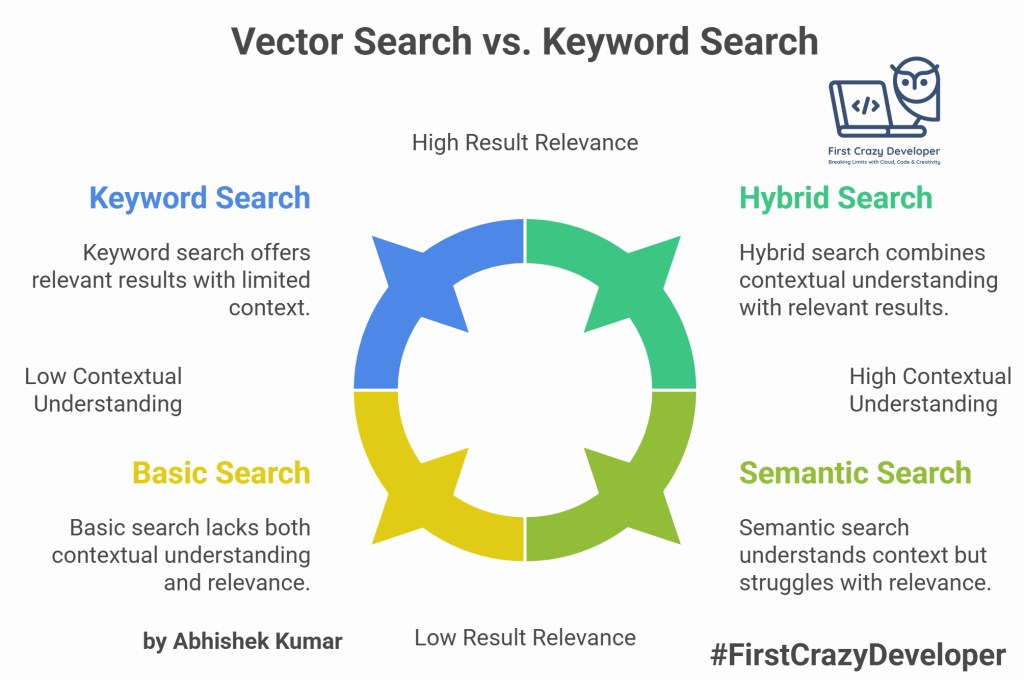
Traditional keyword search engines match exact text terms but often fail to capture semantic meaning. For example, searching for “legal agreement termination” should also surface results mentioning “contract cancellation”, even if the exact words differ.
This is where Vector Search shines. By converting text into embeddings (dense vector representations of meaning), we can perform semantic retrieval across large document collections.
- Explosion of unstructured data: 80% of enterprise data is unstructured (PDFs, DOCX, emails). Traditional search engines can’t extract real meaning from them.
- Regulatory pressure: Legal, ESG, and compliance documents demand precise contextual understanding, not just keyword hits.
- AI-driven enterprise search: Modern organizations want to “talk to their documents”, not manually open 100 PDFs.
- Vector Search = foundation of enterprise copilots. What you’re building here is literally the backbone of enterprise-grade RAG systems.
🧠 “Before you build an AI assistant, you must build a great vector store.”
In this blog, we’ll walk through building a Vector Search Pipeline using Azure Cognitive Search, Azure Blob Storage, Azure OpenAI, and LangChain.
🧩 2The “Aha!” Moment: Keyword vs. Semantic Search
| Feature | Keyword Search | Vector Search |
|---|---|---|
| Matching Logic | Exact term match | Contextual meaning match |
| Example Query | “terminate contract” | Finds “end agreement”, “cancel deal” too! |
| Usefulness | Surface-level | Deep semantic recall |
| Result Relevance | Syntax-based | Concept-based |
Try asking both systems the same question.
Keyword search gives you lines of text.
Vector search gives you answers.⚙️ What Happens Behind the Scenes
You can include this “mental model” section for clarity:
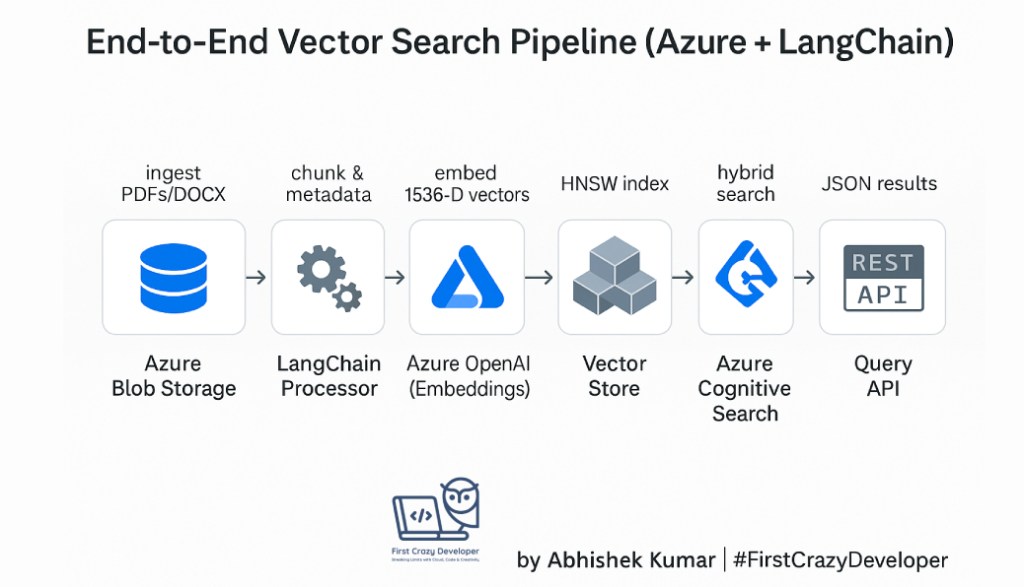
- Chunking: LangChain splits long documents into digestible 1,000-character blocks with slight overlap — preserving meaning across paragraphs.
- Embedding: Each chunk is converted to a 1,536-dimensional vector by Azure OpenAI — a numerical fingerprint of its meaning.
- Indexing: Azure Cognitive Search stores those vectors in an HNSW (Hierarchical Navigable Small World) graph for efficient nearest-neighbor lookup.
- Searching: A query is also embedded → compared to stored vectors → returns most semantically similar chunks (cosine similarity).
- Hybridization: Optionally, combine semantic similarity with keyword scoring for best of both worlds.
🔬 Why LangChain Is a Game-Changer Here
Instead of manually handling text parsing, chunking, and embedding calls, LangChain orchestrates the full lifecycle:
- Loads from PDF, Word, HTML, Markdown, or raw text.
- Handles recursive splitting, preserving semantic continuity.
- Offers Embeddings and VectorStore wrappers for Azure Cognitive Search.
- Extends seamlessly into RAG, chatbots, and multi-agent systems.
👉 You can even turn this pipeline into a Chat with Your Documents app by plugging in
AzureChatOpenAIfor responses grounded in the retrieved chunks.🧠 Best Practices (Developers Love These)
- Use metadata wisely: Store file name, page number, or section header in Azure Search for better traceability.
- Chunk smartly: For legal or policy text, overlap chunks (~100 chars) to prevent sentence fragmentation.
- Async embedding generation: If docs are huge, parallelize embeddings using async jobs or Azure Functions.
- Blob naming conventions: Keep a consistent folder structure (
/policies/2025/q4/legal.pdf) to make indexing predictable.- Incremental updates: You can schedule pipeline triggers (e.g., via Logic App or Event Grid) to only re-index changed files.
🧰 Debugging and Validation Tips
- Check your index dimension — must match embedding dimension (e.g., 1536).
- If you get irrelevant results, inspect your chunk size (too small loses context, too big loses focus).
- Store the embedding vectors temporarily (in Cosmos DB or Blob) for re-use when updating only text.
- Use
similarity_scorein Cognitive Search to filter low-confidence matches.- Always log embeddings and query vectors for audit and improvement.
🔍 Hybrid Search = The Secret Sauce
Many real-world pipelines use a weighted mix of keyword and vector scores — called hybrid search.
Example in Azure Cognitive Search query options:
{
  "vector": { "value": [ ...embedding... ], "fields": "contentVector" },
  "search": "termination contract",
  "top": 5,
  "select": "fileName, chunkId, content",
  "semanticConfiguration": "my-semantic-config",
  "queryType": "semantic"
}
This ensures:
- Keyword precision (e.g., specific clause names)
- Semantic coverage (contextually related clauses)
Hybrid search = the sweet spot between lexical accuracy and semantic understanding.
🚀 Scalability in Azure
This part excites architects:
- Azure Cognitive Search Auto-Scaling handles 100K+ embeddings easily.
- Blob Storage lifecycle rules can archive stale docs automatically.
- Azure Functions / Logic Apps can automate “clear + reload” flow.
- Private Endpoints + VNet integration ensure data stays inside corporate boundaries.
🔒 Security and Compliance
Your readers will appreciate this:
- Data never leaves Azure boundary — using Azure OpenAI ensures enterprise-grade compliance (GDPR, ISO, SOC).
- Managed Identities eliminate key exposure (use
DefaultAzureCredential). - RBAC in Blob + Search ensures only your app can modify the index.
- Audit logs in Cognitive Search help trace document access for governance.
🧭 Future Enhancements
- Add RAG (Retrieval Augmented Generation): Use the retrieved chunks to ground Azure OpenAI ChatGPT responses.
- Add summarization layer: Summarize retrieved documents on-the-fly.
- Add feedback loop: Let users rate results → fine-tune retrieval weights.
- Integrate LangGraph: Build agent workflows where one agent indexes and another retrieves.
- Build an interactive dashboard with Streamlit or FastAPI to visualize similarity scores.
⚡ End-to-End Workflow
Here’s the high-level pipeline we’ll implement:
1️⃣ Clear Index → Delete all documents from an existing Azure Cognitive Search index
2️⃣ Ingest Fresh Docs → Load PDFs and Word docs from Azure Blob Storage
3️⃣ Generate Embeddings → Use Azure OpenAI Embeddings API
4️⃣ Vector + Hybrid Search → Retrieve top-k semantic matches with metadata
This makes our search context-aware and perfect for compliance, legal, and regulatory domains.
🏗 Tech Stack
- Azure Blob Storage → Stores raw documents (PDF, DOCX, etc.)
- Azure Cognitive Search (Vector Search enabled) → Semantic + vector search engine
- Azure OpenAI → Embedding generation (
text-embedding-ada-002ortext-embedding-3-small) - LangChain → Orchestrates document loading, chunking, embedding, and querying
📂 Real-World Use Case
Imagine a legal compliance team at a multinational organization. Every quarter, they upload hundreds of PDF contracts and Word policies into Azure Blob Storage.
Instead of manually browsing these documents, they want to ask:
👉 “What are the termination clauses for vendor contracts in Europe?”
With our pipeline, the team gets semantically relevant snippets with metadata (file name, page, chunk ID) instead of generic keyword matches.
🔧 Implementation – Step by Step
1. Setting up Azure Cognitive Search for Vector Indexing
When creating an index in Azure Cognitive Search:
- Define a
contentVectorfield with typeCollection(Edm.Single) - Enable vector search capabilities
Index schema example:
{
  "name": "documents-index",
  "fields": [
    { "name": "id", "type": "Edm.String", "key": true },
    { "name": "content", "type": "Edm.String" },
    { "name": "contentVector", "type": "Collection(Edm.Single)", "searchable": true, "vectorSearchDimensions": 1536, "vectorSearchConfiguration": "default" },
    { "name": "fileName", "type": "Edm.String" },
    { "name": "chunkId", "type": "Edm.String" }
  ],
  "vectorSearch": { "algorithmConfigurations": [{ "name": "default", "kind": "hnsw" }] }
}
2. Python Implementation with LangChain
from azure.identity import DefaultAzureCredential
from azure.search.documents import SearchClient, SearchIndexClient
from azure.storage.blob import BlobServiceClient
from langchain.document_loaders import UnstructuredFileLoader
from langchain.text_splitter import RecursiveCharacterTextSplitter
from langchain_openai import AzureOpenAIEmbeddings
import os

# --- Setup environment variables ---
AZURE_SEARCH_ENDPOINT = os.getenv("AZURE_SEARCH_ENDPOINT")
AZURE_SEARCH_KEY = os.getenv("AZURE_SEARCH_KEY")
AZURE_STORAGE_CONNECTION = os.getenv("AZURE_STORAGE_CONNECTION")
CONTAINER_NAME = "contracts"
INDEX_NAME = "documents-index"

# --- Step 1: Connect to Cognitive Search ---
search_client = SearchClient(endpoint=AZURE_SEARCH_ENDPOINT,
                             index_name=INDEX_NAME,
                             credential=DefaultAzureCredential())

# Clear index
search_client.delete_documents(documents=[{"id": doc["id"]} for doc in search_client.search("*")])

# --- Step 2: Load documents from Blob Storage ---
blob_service = BlobServiceClient.from_connection_string(AZURE_STORAGE_CONNECTION)
container_client = blob_service.get_container_client(CONTAINER_NAME)

docs = []
for blob in container_client.list_blobs():
    blob_client = container_client.get_blob_client(blob)
    local_file = f"/tmp/{blob.name}"
    with open(local_file, "wb") as f:
        f.write(blob_client.download_blob().readall())

    loader = UnstructuredFileLoader(local_file)
    docs.extend(loader.load())

# --- Step 3: Split text + Generate embeddings ---
splitter = RecursiveCharacterTextSplitter(chunk_size=1000, chunk_overlap=100)
chunks = splitter.split_documents(docs)

embeddings = AzureOpenAIEmbeddings(
    deployment="embedding-model",
    model="text-embedding-ada-002"
)

# --- Step 4: Upload to Azure Search ---
to_upload = []
for i, chunk in enumerate(chunks):
    vec = embeddings.embed_query(chunk.page_content)
    to_upload.append({
        "id": str(i),
        "content": chunk.page_content,
        "contentVector": vec,
        "fileName": chunk.metadata.get("source", ""),
        "chunkId": str(i)
    })

search_client.upload_documents(documents=to_upload)

# --- Step 5: Perform a vector search ---
results = search_client.search(
    search_text="termination clause Europe",
    vector={"value": embeddings.embed_query("termination clause Europe"), "fields": "contentVector"},
    top=3
)

for r in results:
    print(f"File: {r['fileName']}, Chunk: {r['chunkId']}")
    print(f"Snippet: {r['content'][:200]}...\n")
3. C# Implementation with Azure SDK
using Azure;
using Azure.Search.Documents;
using Azure.Search.Documents.Indexes;
using Azure.Search.Documents.Models;
using Azure.Storage.Blobs;
using System.Text.Json;
using OpenAI.Embeddings;

class Program
{
    static async Task Main()
    {
        string searchEndpoint = Environment.GetEnvironmentVariable("AZURE_SEARCH_ENDPOINT");
        string searchKey = Environment.GetEnvironmentVariable("AZURE_SEARCH_KEY");
        string indexName = "documents-index";
        string blobConnection = Environment.GetEnvironmentVariable("AZURE_STORAGE_CONNECTION");
        string containerName = "contracts";

        var credential = new AzureKeyCredential(searchKey);
        var searchClient = new SearchClient(new Uri(searchEndpoint), indexName, credential);

        // Step 1: Clear index
        await searchClient.DeleteDocumentsAsync("id", new[] { "all" });

        // Step 2: Load documents from Blob Storage
        var blobService = new BlobServiceClient(blobConnection);
        var containerClient = blobService.GetBlobContainerClient(containerName);

        var docs = new List<SearchDocument>();
        int id = 0;

        foreach (var blob in containerClient.GetBlobs())
        {
            var blobClient = containerClient.GetBlobClient(blob.Name);
            using var stream = await blobClient.OpenReadAsync();
            using var reader = new StreamReader(stream);
            string content = await reader.ReadToEndAsync();

            // Call Azure OpenAI Embeddings
            var embeddingClient = new EmbeddingsClient(new Uri("https://your-openai-endpoint"), new AzureKeyCredential("YOUR_KEY"));
            var embedding = await embeddingClient.GenerateAsync("text-embedding-ada-002", content);

            docs.Add(new SearchDocument
            {
                ["id"] = id.ToString(),
                ["content"] = content,
                ["contentVector"] = embedding.Value,
                ["fileName"] = blob.Name,
                ["chunkId"] = id.ToString()
            });

            id++;
        }

        // Step 3: Upload docs
        await searchClient.UploadDocumentsAsync(docs);

        // Step 4: Query vector search
        var queryVector = await embeddingClient.GenerateAsync("text-embedding-ada-002", "termination clause Europe");

        var options = new SearchOptions
        {
            VectorSearch = new()
            {
                KNearestNeighborsCount = 3,
                Fields = { "contentVector" },
                Value = queryVector.Value
            }
        };

        var results = searchClient.Search<SearchDocument>("termination clause Europe", options);

        await foreach (var result in results.GetResultsAsync())
        {
            Console.WriteLine($"File: {result.Document["fileName"]}, Chunk: {result.Document["chunkId"]}");
            Console.WriteLine($"Snippet: {result.Document["content"].ToString().Substring(0, 200)}...\n");
        }
    }
}
🎯 Key Benefits
✔ Automated refresh → Old index cleared, new docs ingested
✔ Hybrid retrieval → Combines semantic + keyword search
✔ Metadata-rich results → File name + chunk ID for traceability
✔ Scalable → Handles large legal, compliance, and policy document repositories
📝 Abhishek Take
In modern enterprises, compliance and legal accuracy can’t rely on keyword search alone. Vector Search pipelines with Azure Cognitive Search + LangChain empower organizations to search meaning, not just words. This is where AI transforms from a “nice-to-have” to a business-critical tool.
“This workflow is where AI meets enterprise pragmatism. We’re not just searching — we’re thinking with our data.
In regulatory and compliance systems, one missed clause can cost millions.
A vector search pipeline turns every document into a semantic asset — searchable by meaning, not syntax.”
✅ Conclusion
We just built an end-to-end semantic search pipeline with:
- Azure Cognitive Search (Vector Search)
- Azure Blob Storage
- Azure OpenAI (Embeddings)
- LangChain
This architecture is production-ready and can be extended with RAG (Retrieval-Augmented Generation) for building AI copilots that cite exact sources from your organization’s knowledge base.
🗣 Talking Points
🔥 “Search is dead; understanding is the new search.”
🚀 “We replaced keyword matching with meaning matching — and compliance teams are 10× faster.”
💬 “When you combine Azure Cognitive Search + LangChain + OpenAI, you’re not building search… you’re building understanding.”#Azure #LangChain #VectorSearch #AzureOpenAI #CognitiveSearch #AI #DataEngineering #AbhishekKumar #FirstCrazyDeveloper #SemanticSearch #RAG #OpenAI #CloudArchitecture
 First Crazy Developer
Leave a comment