
✍️ By Abhishek Kumar | #FirstCrazyDeveloper
Modern apps don’t fail because the logic is wrong, they fail because they’re slow. Azure Managed Redis gives you sub-millisecond data access, turning costly database calls into in-memory hits you can trust. It’s a fully managed, enterprise-grade Redis service with sharding, high availability, and private networking, perfect for cache-aside patterns, session stores, and real-time features. In this guide, we’ll show how to plug it into your architecture, measure the gains, and ship faster without rewriting your core systems.
1. Why use Azure Managed Redis?
In modern cloud-native applications, performance and responsiveness often hinge on how quickly you can serve frequently accessed data. A traditional backend database—even one optimized for OLTP—can still become a bottleneck because of disk I/O, network latency, locks, or schema complexity. Enter an in-memory datastore: one that serves data orders-of-magnitude faster.
Microsoft’s Azure Managed Redis (AMR) is a fully managed, enterprise-grade Redis service built on the Redis Enterprise software stack. It brings:
- In-memory, ultra-low latency reads/writes. Microsoft Learn+2Microsoft Learn+2
- High throughput and scalability for large workloads. Microsoft Learn+1
- Rich data structures (beyond simple key-value) for more advanced scenarios. Redis+1
- Cloud-native features: managed service, high availability, scaling, TLS, etc. Microsoft Learn+1
For developers and architects, the big question is: “How do I integrate this with my architecture to actually improve performance (and not introduce complexity)?” In this blog we’ll walk that through, including a real-world example (cache-aside pattern), code in both C# and Python, and a behind-the-scenes view of how the service is architected so you can design properly (and avoid pitfalls).
2. Typical Use Cases and Patterns
Here are common patterns where Redis fits well (and where Azure Managed Redis supports them):
| Pattern | Description | How Redis helps |
|---|---|---|
| Data Cache (Cache-Aside) | The application reads from a “cold” primary system (e.g., a database) when necessary, but for heavy read patterns it first checks the cache. | Avoid hitting the database for repeated reads; serve from memory. Microsoft Learn+1 |
| Session Store | Web applications store user-session data (cart contents, preferences, etc.) in a shared store rather than per-server memory. | Fast shared access with low latency; can scale web-farm horizontally. Microsoft Learn |
| Content Cache / Output Cache | Static or semi-static content (menu headers, UI fragments) cached so the backend doesn’t regenerate it. | Reduces backend load, makes UI snappier. Microsoft Learn |
| Message / Queue / Leaderboards | Redis supports lists, sorted sets, pub/sub, etc. Useful for queueing tasks, real-time leaderboards, etc. | In-memory, fast operations for near-real-time scenarios. Microsoft Learn+1 |
| AI / GenAI / Vector Search | Emerging scenario: storing vector embeddings (for similarity search), time-series, probabilistic data structures. AMR supports these advanced capabilities. Redis+1 |
Given your context (you work in cloud/labeling/integration/enterprise), one of the strongest wins is the data-cache pattern: e.g., pulling label payloads, product info, regulatory sentences from SAP/other systems, and caching them so that repeated requests don’t hit the backend each time. Use of Redis as a cache layer can drastically improve latency and reduce load on the primary systems.
3. Behind-the-Scenes: Architecture of Azure Managed Redis
To design correctly (and especially as you scale for enterprise usage, multi-region, HA, etc.), it’s crucial to understand how AMR is structured under the covers.
3.1 Basic architecture

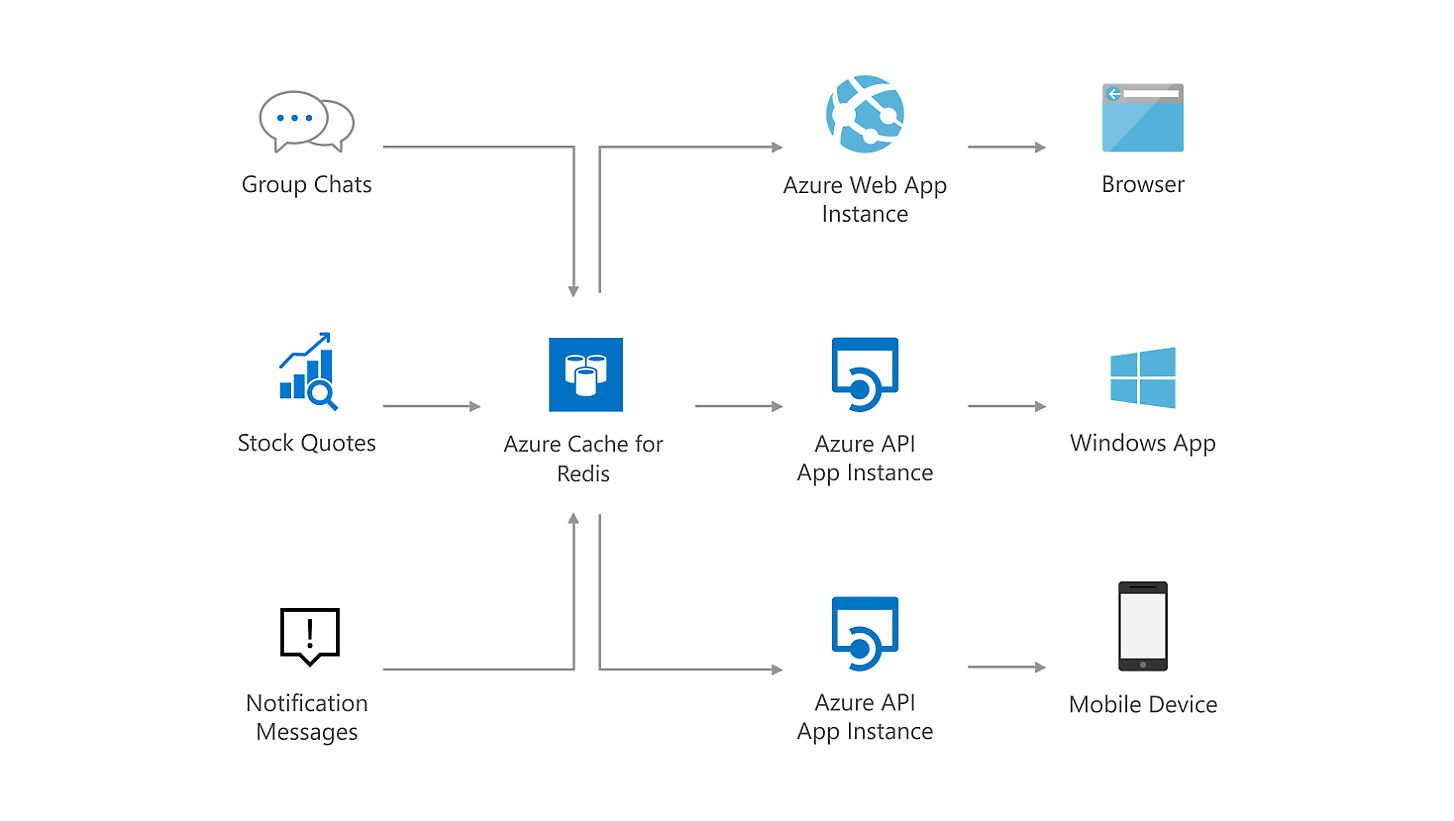

Key points:
- Unlike the older community-Redis based offerings (single threaded, single process per VM), AMR uses the Redis Enterprise stack: multiple shards (Redis server processes) running in parallel on each VM/node, allowing full use of multi-core vCPUs. Microsoft Learn+1
- Each “node” (VM) hosts multiple shards; the shards are distributed so that primaries and replicas are spread across nodes to improve availability and performance. Microsoft Learn
- A high-performance proxy process handles client connections, routes commands to the right shard, deals with failures, and helps self-healing. This means your clients connect to a single endpoint but behind the scenes the service distributes across shards transparently. Microsoft Learn
- Clustering and sharding are built-in. Data is partitioned (sharded) across the shards based on key hashing so that throughput scales as you add vCPUs/shards. Microsoft Learn+1
3.2 Cluster policies
AMR supports different cluster policies: OSS (open-source style Redis cluster API), Enterprise clustering, Non-Clustered. Each has trade-offs (e.g., for compatibility vs highest throughput). Microsoft Learn
3.3 Tiering, performance & high availability
- Four tiers: Memory Optimized, Balanced (Memory+Compute), Compute Optimized, Flash-Optimized (data in memory + NVMe storage) for large datasets. Microsoft Learn+1
- Multi-region active-active support (in some tiers) for global presence and geo-distributed latency. Redis+1
- High availability architecture: replicas, automatic failover, data persistence options. Microsoft Learn
3.4 What this means for you as architect/developer
- Because sharding and multi-core use are supported, you get near-linear scaling of throughput as you increase vCPUs/shards (assuming correct partitioning).
- The proxy layer means you don’t have to worry about clients manually routing to shards (unless you want fine-grained control).
- You need to design for data partitioning (i.e., key design), eviction policies (if dataset > memory), failover/fault tolerance, monitoring/metrics.
- Latency is extremely low (sub-millisecond in-memory), but network, serialization/deserialization and cache-misses still matter: design your cache-aside logic accordingly.
- Migration path: If you’re moving from legacy Azure Cache for Redis tiers to AMR, there are considerations. Azure Documentation
4. Real-World Example: Caching Label Payloads in an Enterprise Integration Scenario
Let’s assume you’re working at an enterprise (like your context with a label printing solution, multiple upstream systems, etc.). You have a backend database (or SAP system) that produces label-payloads (for a Process Order or Sales Order) and you expect many downstream systems (or micro-services) to query that payload for printing, UI display, analytics, etc.
Without a cache: each request hits the SAP system or database → latency seconds or tens of ms, high load during bursts (printing waves), risk of saturation.
With Azure Managed Redis: you store the label-payload in Redis, keyed by Order ID. Downstream services go to Redis first; only if cache-miss then fallback to SAP/DB, then populate the cache. Result: sub-ms access, backend load reduced, smoother printing pipeline.
4.1 Cache-Aside Pattern – Pseudocode
C# example:
// using StackExchange.Redis client for example
using StackExchange.Redis;

public class LabelPayloadService
{
    private readonly IDatabase _cache;
    private readonly IBackendLabelProvider _backend;  // e.g., SAP or DB
    private readonly TimeSpan _cacheTtl = TimeSpan.FromMinutes(10);

    public LabelPayloadService(ConnectionMultiplexer redis, IBackendLabelProvider backend)
    {
        _cache = redis.GetDatabase();
        _backend = backend;
    }

    public async Task<LabelPayload> GetPayloadAsync(string processOrderId)
    {
        string cacheKey = $"LabelPayload:{processOrderId}";
        var cached = await _cache.StringGetAsync(cacheKey);
        if (cached.HasValue)
        {
            // deserialize
            return JsonSerializer.Deserialize<LabelPayload>(cached);
        }
        // Cache miss
        var payload = await _backend.FetchPayloadAsync(processOrderId);
        if (payload != null)
        {
            string serialized = JsonSerializer.Serialize(payload);
            await _cache.StringSetAsync(cacheKey, serialized, _cacheTtl);
        }
        return payload;
    }
}
Python example:
import aioredis
import asyncio
import json
from datetime import timedelta

class LabelPayloadService:
    def __init__(self, redis: aioredis.Redis, backend):
        self._redis = redis
        self._backend = backend
        self._cache_ttl = timedelta(minutes=10)

    async def get_payload(self, process_order_id: str):
        cache_key = f"LabelPayload:{process_order_id}"
        cached = await self._redis.get(cache_key)
        if cached:
            return json.loads(cached)
        # cache miss
        payload = await self._backend.fetch_payload(process_order_id)
        if payload is not None:
            await self._redis.set(cache_key, json.dumps(payload), ex=self._cache_ttl)
        return payload

# usage
async def main():
    redis = await aioredis.from_url("rediss://<your-amr-endpoint>:10000", password="<key>")
    backend = SAPLabelProvider()
    svc = LabelPayloadService(redis, backend)
    payload = await svc.get_payload("PO12345")
    print(payload)

asyncio.run(main())
4.2 Things to consider
- Cache key design: Use meaningful patterns (
LabelPayload:{ProcessOrderId}) so you can later use key-scans or wildcard patterns if necessary. - TTL / Eviction: Decide how long you keep payloads. If label payloads update frequently (e.g., regulatory changes), adjust TTL accordingly, or implement manual invalidation.
- Fallback on cache-miss: As shown, you load from backend and then write into Redis. Ensure you handle errors/failures gracefully (e.g., backend fails but cache stale data still present).
- Concurrency / Cache stampede: If many requests for the same key come at once and miss, you may hit backend heavily. Use locking or “double-check” pattern (or Redis “set-nx” pattern) to avoid stampede.
- Serialization format: Choose efficient serialization (JSON, Protobuf, etc.). Keep sizes small.
- Data size vs memory: Monitor memory usage and throughput; if you store many large payloads you may need a larger SKU or eviction strategy.
- Monitoring & metrics: Use Redis metrics (cache hits, misses, memory, CPU, latency) and Azure Monitor to watch performance and decide on scaling.
- High availability & geo-distribution: If your printing sites are global (e.g., Europe, US, Asia), consider multi-region cache or active-active configuration so latency remains low for all sites.
4.3 Code sample – advanced (C#) with distributed lock
If you anticipate high concurrency on cache-misses, you can implement a simple distributed lock inside Redis to prevent multiple backend hits:
public async Task<LabelPayload> GetPayloadWithLockAsync(string processOrderId)
{
    string cacheKey = $"LabelPayload:{processOrderId}";
    var cached = await _cache.StringGetAsync(cacheKey);
    if (cached.HasValue)
        return JsonSerializer.Deserialize<LabelPayload>(cached);

    string lockKey = $"Lock:LabelPayload:{processOrderId}";
    bool gotLock = await _cache.LockTakeAsync(lockKey, Environment.MachineName, TimeSpan.FromSeconds(10));

    if (gotLock)
    {
        try
        {
            // re-check cache after acquiring lock
            cached = await _cache.StringGetAsync(cacheKey);
            if (cached.HasValue)
                return JsonSerializer.Deserialize<LabelPayload>(cached);

            // fetch backend
            var payload = await _backend.FetchPayloadAsync(processOrderId);
            if (payload != null)
            {
                string serialized = JsonSerializer.Serialize(payload);
                await _cache.StringSetAsync(cacheKey, serialized, _cacheTtl);
            }
            return payload;
        }
        finally
        {
            await _cache.LockReleaseAsync(lockKey, Environment.MachineName);
        }
    }
    else
    {
        // other thread/process holds lock. Wait a bit and retry reading cache
        await Task.Delay(TimeSpan.FromMilliseconds(100));
        return await GetPayloadAsync(processOrderId);
    }
}
This pattern prevents a “cache-miss storm” hitting the backend service.
5. Architectural Considerations & Best Practices
Here are deeper architectural considerations (especially relevant for you as a technical architect) when integrating Azure Managed Redis in enterprise solutions.
5.1 Data partitioning & key design
- Choose key space namespacing. E.g.:
TenantId:LabelPayload:OrderId. This helps multi-tenant isolation and cleanup. - Sharding is internal to AMR, but you still should design for “hot keys”: if your workload has a few popular keys with very high access, ensure those are spread (or consider replicating/priming them) to avoid skew.
- Avoid “big” objects that exceed memory boundaries. If payload size is large (e.g., many MB), consider splitting or storing in backend with cached pointers.
5.2 Eviction and TTL strategies
- Decide whether it’s acceptable for your cached data to expire (and force a backend load) vs staying indefinitely. TTL helps keep data fresh and memory under control.
- Use appropriate eviction policy (LRU, LFU, etc.) if you might exceed memory. Monitor memory pressure.
- For critical data (e.g., label templates must always exist), consider “pinning” objects (no TTL) and monitoring memory usage.
5.3 Consistency / Staleness
- Remember: Redis is a cache, not your system of record. If backend data updates, you need a strategy to invalidate or update the cache.
- For high-update scenarios, consider write-through or cache-update on change patterns (e.g., when backend writes, publish event to invalidate/update cache).
- For mutable data, design a fallback for cases where cache is stale (e.g., check backend version, or allow short TTLs).
5.4 Scaling & SLA
- Choose the right SKU in AMR based on memory size, vCPU, throughput. Larger workloads require more shards and higher tiers. Microsoft Learn+1
- Monitor key metrics:
- Cache hit ratio (hits / total)
- Latency (get/set times)
- Memory usage and fragmentation
- CPU, I/O wait (if using flash tier)
- For global scenarios, consider geo-replication / active-active so different regions have local cache endpoints. Ensure your application uses the nearest cache endpoint.
5.5 Security & Network
- Use TLS (AMR supports TLS 1.2 and 1.3). Azure Documentation
- Use Azure Private Link / VNet integration to secure network traffic.
- Use Azure RBAC or authorisation features (AMR supports MS Entra ID integration) to control access. Microsoft Learn+1
- Use firewall/network-security rules so only your app services or VMs can access the cache.
5.6 Monitoring, Alerting & Observability
- Use Azure Monitor metrics for Redis: cache hits/misses, memory usage, connections, replication lag, latency.
- Set alerts for thresholds: e.g., memory usage > 80 %, hit ratio < 90 %, latency > X ms.
- Use Redis’ internal commands (
INFO,CLIENT LIST, etc) if you want deeper diagnostics (via CLI). - Use logging/tracing in your application to correlate cache performance with backend load.
5.7 Cost-Benefit & ROI
- Caching reduces database (or SAP) load and latency, enabling faster response times, better user experience, and potentially fewer backend resources (e.g., database instances).
- But caching adds a cost: the cache size, memory, and management. So you should measure before/after: latency reduction, backend calls reduced, cost saved in backend vs cost of cache.
- Purge strategies: If certain data becomes stale or usage patterns change, you should review whether those dataset still deserve to be in cache.
6. Real-Code Implementation Walk-Through (C# + Python)
6.1 Preparation: Provisioning Azure Managed Redis
- In the Azure Portal, create an Azure Managed Redis instance in your subscription. Choose region, tier (e.g., Balanced), set memory size according to expected dataset (e.g., 10 GB).
- Configure network: VNet or Public Endpoint + firewall rules.
- Enable TLS only, enable authentication via access key or Azure AD (if supported).
- Note connection string: something like
yourcache.redis.cache.windows.net:10000with port 10000 (AMR uses port 10000 for TLS) Azure Documentation - Configure any replication / geo-region if needed.
- Note the access key or Azure AD identity to connect.
6.2 Code: C# (.NET)
using System;
using System.Text.Json;
using System.Threading.Tasks;
using StackExchange.Redis;

namespace MyApp.Cache
{
    public class RedisCacheClient
    {
        private readonly ConnectionMultiplexer _redis;
        private readonly IDatabase _db;

        public RedisCacheClient(string configuration)
        {
            _redis = ConnectionMultiplexer.Connect(configuration);
            _db = _redis.GetDatabase();
        }

        public async Task SetAsync<T>(string key, T value, TimeSpan? expiry = null)
        {
            string serialized = JsonSerializer.Serialize(value);
            await _db.StringSetAsync(key, serialized, expiry);
        }

        public async Task<T> GetAsync<T>(string key)
        {
            var value = await _db.StringGetAsync(key);
            if (!value.HasValue)
                return default;
            return JsonSerializer.Deserialize<T>(value);
        }
    }
}
Usage in your label payload service (from earlier example) is straightforward.
6.3 Code: Python (async)
import asyncio
import json
from datetime import timedelta
import aioredis

class RedisCacheClient:
    def __init__(self, redis):
        self._redis = redis

    async def set(self, key: str, value: dict, ttl: timedelta = None):
        serialized = json.dumps(value)
        if ttl:
            await self._redis.set(key, serialized, ex=ttl)
        else:
            await self._redis.set(key, serialized)

    async def get(self, key: str):
        val = await self._redis.get(key)
        if val is None:
            return None
        return json.loads(val)

async def main():
    redis = await aioredis.from_url("rediss://<host>:10000", password="<key>")
    client = RedisCacheClient(redis)
    key = "LabelPayload:PO12345"
    val = await client.get(key)
    if val:
        print("Cached payload:", val)
    else:
        print("Cache miss – fetching backend…")
        # fetch from backend
        payload = await fetch_backend_payload("PO12345")
        await client.set(key, payload, ttl=timedelta(minutes=10))

asyncio.run(main())
6.4 Testing & Measurement
- Before caching: measure latency of backend retrieval for label payload (e.g., 150 ms).
- After caching: measure latency for Redis get (e.g., ~1–2 ms).
- Measure backend calls per minute before/after to demonstrate reduction (e.g., 1000 → 200).
- Monitor memory usage, hit ratio in Redis:
redis-cli -h <host> -p 10000 -a <key> INFOor via Azure Monitor.
7. Pitfalls to Avoid & Lessons Learned
- Over-caching: If you cache too much (huge payloads, seldom used keys) you might fill memory and cause evictions/unexpected behaviour.
- Cache stampede: Many clients on cache-miss can overload backend unless you use locking or smarter strategies.
- Ignoring TTL/invalidations: If backend data changes but cache doesn’t, you get stale values – for label printing you may print wrong label.
- Latency from remote region: If your services are in different region than Redis, network latency can overshadow gains. Use regional cache or geo-replication.
- Key collision / namespace leakage: Especially in multi-tenant/multi-system scenario, use key prefixes and maybe separate caches if isolation is needed. (see multitenancy guidance) Microsoft Learn
- Monitoring blindspots: Not monitoring hit ratio or memory means you don’t know when your cache is not doing its job.
- Using as database substitute: Don’t treat Redis as your primary datastore unless you understand trade-offs (durability, data loss, persistence). It’s primarily a cache (unless you design differently). Microsoft warns about data loss risk. Microsoft Learn+1
- Ignoring scaling requirements: If workload grows (e.g., more orders, more sites), you may need to scale up/out the cache instance; the architecture supports it but you must plan. Redis+1
8. Summary & Recommended Architecture Flow
Here’s how I’d recommend you (in your role as architect) integrate AMR into a typical enterprise label-printing solution, given your context (you’re working with label print requests, SAP Saturn, multiple upstream systems, Azure, etc.):
- Identify high-volume read patterns: e.g., label payloads for Process Orders that many print-stations might request.
- Provision Azure Managed Redis: Choose region close to your print farm/GW, select tier (balanced) with enough memory for expected unique keys.
- Define cache key strategy:
Tenant:LabelPayload:ProcessOrderId. TTL maybe 30 minutes (or depending on update frequency). - Implement cache layer in your micro-service: code (C#/Python) to first check cache, then backend, then populate cache. Use distributed lock if concurrency high.
- Instrumentation: collect metrics on cache hits, misses, latency, backend calls. Monitor memory usage.
- Failover / fallback logic: if Redis unavailable (rare, but possible), fallback to backend seamlessly. Cache layer should be optional.
- Invalidation strategy: On label payload update (via SAP or regulatory system), send event so cache entry is removed/updated. Or set reasonable TTL.
- Scale out as needed: If print stations expand globally, consider geo-replication or regional AMR instances.
- Secure and network isolate: Use VNet integration, TLS, restrict access to your application.
- Review ROI: After 1-2 weeks in production, review how many backend calls were avoided, what latency improvement gained, what cost savings (or avoided cost) you achieved.
9. Final Thoughts
For you, as someone experienced in Azure, Microsoft technologies, integrations with SAP, printing workflows (like your work with Loftware, control centre, etc.), leveraging Azure Managed Redis offers a powerful lever to improve responsiveness, reduce backend load, and scale your print label query & distribution architecture more efficiently.
By combining the right architecture (cache-aside, key design, invalidation), code (C# / Python) and operational practices (monitoring, scaling, security), you’ll create a solution that is not just “faster” but robust, manageable and cost-effective.
Abhishek’s Take
- Speed is a feature. Azure Managed Redis (AMR) converts “slow-but-correct” backends into “fast-and-correct” experiences. I’ve seen 10–100× latency improvements on hot paths without touching core business logic.
- Cache what’s expensive, not what’s easy. Profile first. Cache the joins, API fan-outs, and computed projections that actually cost you time and money.
- Design the invalidation on day 1. TTL + event-driven invalidation (publish/subscribe or change events) beats sporadic “manual clears.”
- Make it boring to operate. Private Link, VNet integration, Key Vault for secrets, managed identity, and Azure Monitor alerts—so the platform keeps you safe and noisy when it matters.
- Measure ROI, not just P99. Show reduced DB/SAP calls, smaller compute footprints, faster user flows, and fewer timeouts during peak bursts. That’s the business story.
#Azure #AzureRedis #AzureManagedRedis #CloudArchitecture #Microservices #Caching #PerformanceEngineering #DistributedSystems #Developers #SoftwareArchitecture #CloudNative #DotNet #PythonDevelopers #AzureArchitect #Scalability #HighPerformanceComputing #FirstCrazyDeveloper #AbhishekKumar
 First Crazy Developer
Leave a comment