
✍️ 𝐁𝐲 𝐀𝐛𝐡𝐢𝐬𝐡𝐞𝐤 𝐊𝐮𝐦𝐚𝐫 | #𝐅𝐢𝐫𝐬𝐭𝐂𝐫𝐚𝐳𝐲𝐃𝐞𝐯𝐞𝐥𝐨𝐩𝐞𝐫
🧠 Introduction
In today’s connected world, the Internet of Things (IoT) has become the digital nervous system of industries, cities, and homes.
But what truly powers this intelligence are the IoT sensors — the components that sense, measure, and translate physical reality into digital data.
Think of IoT Sensors as the “eyes, ears, nose, and skin” of smart systems.
They sense temperature, detect movement, measure humidity, capture images, and even analyze water quality.
🧩 Why IoT Sensors Matter
Without sensors, IoT would be blind.
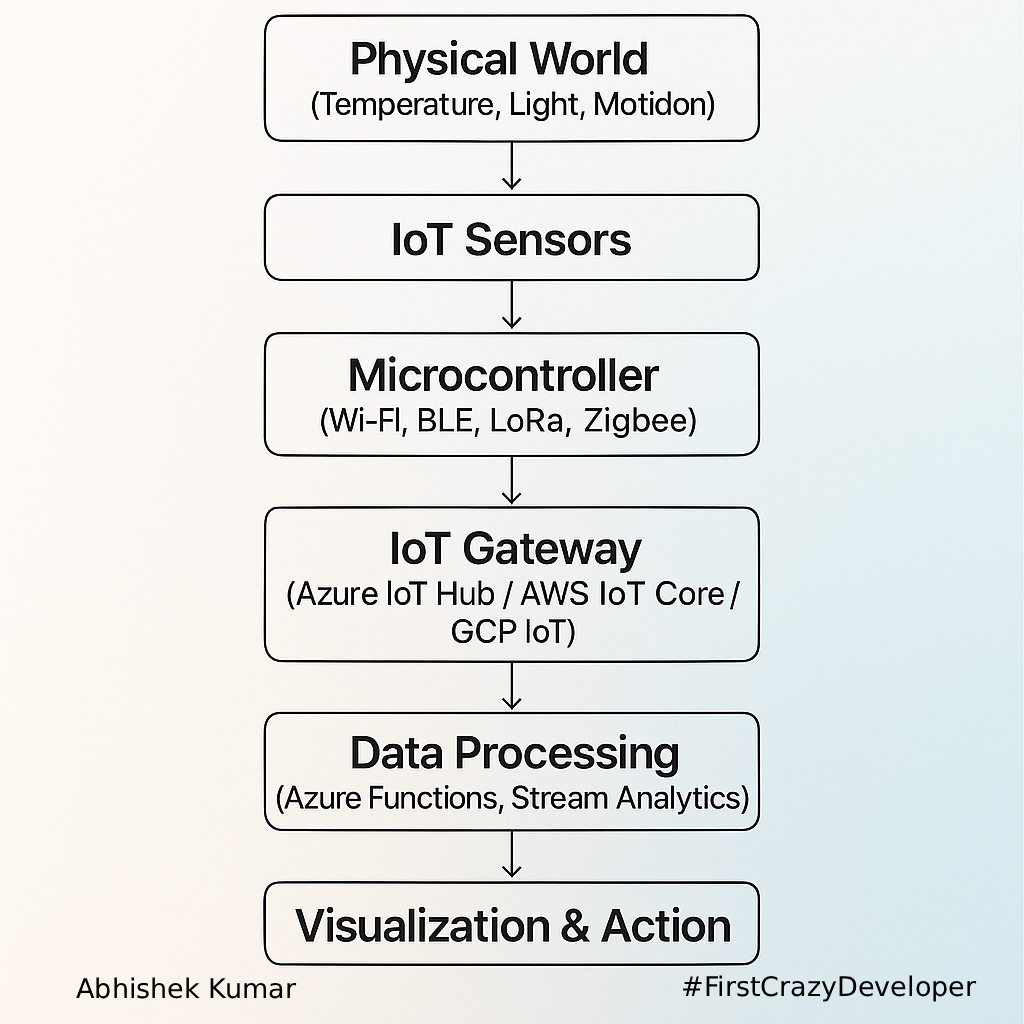
Sensors form the first stage of the IoT data pipeline:
Sensing → Connectivity → Processing → Decision → Action
They allow systems to perceive their environment and make data-driven decisions — autonomously or via cloud analytics.
🧪 Types of IoT Sensors and Real-World Examples
Below is a breakdown of the most impactful IoT sensors used across industries.
🌡️ 1. Temperature Sensor
Function: Measures heat energy or the hotness/coldness of an object or environment.
Real-World Example:
- Smart Thermostats (Nest, Ecobee) — monitor room temperature and optimize energy consumption.
- Industrial IoT: Cold storage warehouses use temperature sensors to maintain product safety.
Python Example (using DHT22 on Raspberry Pi):
import Adafruit_DHT

sensor = Adafruit_DHT.DHT22
pin = 4  # GPIO pin

humidity, temperature = Adafruit_DHT.read_retry(sensor, pin)
if humidity is not None and temperature is not None:
    print(f"Temp={temperature:.2f}°C  Humidity={humidity:.2f}%")
else:
    print("Sensor failure. Check wiring.")
C# Example (Azure IoT Edge module simulation):
using System;
using System.Threading.Tasks;
using Microsoft.Azure.Devices.Client;
using Newtonsoft.Json;

class Program
{
    static async Task Main()
    {
        var deviceClient = DeviceClient.CreateFromConnectionString(
            "<IoT-Hub-Connection-String>", TransportType.Mqtt);

        var random = new Random();
        while (true)
        {
            var data = new { temperature = random.Next(15, 30), humidity = random.Next(40, 80) };
            string message = JsonConvert.SerializeObject(data);

            await deviceClient.SendEventAsync(new Message(System.Text.Encoding.UTF8.GetBytes(message)));
            Console.WriteLine($"Sent: {message}");
            await Task.Delay(5000);
        }
    }
}
💧 2. Humidity Sensor
Function: Measures the amount of water vapor in the air.
Use Case:
- Agriculture: Smart irrigation adjusts water supply based on humidity levels.
- HVAC systems: Maintain comfort and air quality.
💨 3. Gas Sensor
Function: Detects gases like CO₂, CO, CH₄, or LPG.
Use Case:
- Smart Factories: Detect gas leaks early to prevent hazards.
- Smart Homes: Integrated with alarms for CO poisoning alerts.
🌊 4. Water Quality Sensor
Function: Measures pH, turbidity, and dissolved oxygen.
Use Case:
- Municipal Water Systems: Monitor pollution levels in real time.
- Smart Aquaculture: Optimize water quality for fish farms.
🛑 5. Proximity Sensor
Function: Detects nearby objects without physical contact.
Use Case:
- Parking Sensors: Detect vehicle distance.
- Retail IoT: Trigger advertisements when customers approach shelves.
⚙️ 6. Accelerometer & Gyroscope
Function:
- Accelerometer measures linear motion.
- Gyroscope measures rotation.
Use Case:
- Wearables: Fitness trackers detect steps and orientation.
- Industrial Machines: Predictive maintenance based on vibration analysis.
📸 7. Image & Optical Sensors
Function: Capture light or visual information.
Use Case:
- Smart Cities: Traffic monitoring and facial recognition.
- Manufacturing: Quality inspection and defect detection.
Python Example – Capturing Image and Sending to Cloud:
import cv2
import requests

camera = cv2.VideoCapture(0)
ret, frame = camera.read()
cv2.imwrite("image.jpg", frame)
camera.release()

files = {'file': open('image.jpg', 'rb')}
requests.post("https://your-api-endpoint/upload", files=files)
🧲 8. Hall Effect Sensor
Function: Detects magnetic fields, often used for rotational speed sensing.
Use Case:
- Electric Vehicles: Measure wheel speed and motor rotation.
- Smart Meters: Detect tampering.
🔥 9. Smoke Sensor
Function: Detects smoke concentration using photoelectric or ionization methods.
Use Case:
- Smart Buildings: Automated fire alarm and emergency notifications to mobile apps.
🧪 10. Quality Sensors
Function: Evaluate air or environmental quality by measuring particulates, gases, or temperature.
Use Case:
- Smart Cities: Pollution monitoring (PM2.5/PM10).
- Healthcare Facilities: Ensure clean air in operating rooms.
⚙️ IoT Sensor Data Flow Architecture
🚀 Integration with Azure IoT Architecture
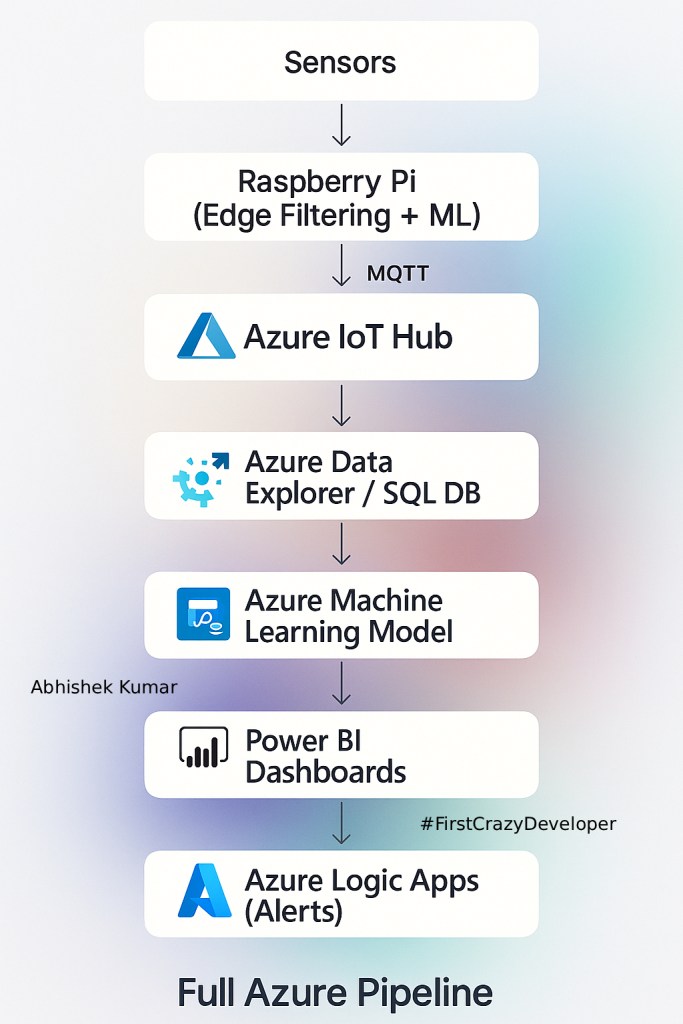
You can integrate these sensors with Azure IoT Hub, Stream Analytics, and Azure Functions to create real-time intelligent systems.
Example Workflow:
- Sensor → Edge Device (Raspberry Pi)
- Edge Device → Azure IoT Hub (MQTT)
- IoT Hub → Azure Stream Analytics
- Stream Analytics → Power BI Dashboard
- Alerts via Azure Logic Apps

🔍 Key Points
| Benefit | Description |
|---|---|
| 🌡️ Real-time Monitoring | Live data from environment and machines |
| ⚙️ Predictive Maintenance | Detect issues before failures occur |
| 💰 Cost Efficiency | Automation reduces manual checks |
| 🌱 Sustainability | Optimize energy and resource usage |
| 🔒 Safety | Early detection of hazards like gas leaks or smoke |
⚡ IoT Sensor Data Challenges and How to Solve Them
🔥 Common IoT Sensor Challenges
| Problem | Description | How to Fix |
|---|---|---|
| Sensor Drift | Sensors become inaccurate over time | Calibration + ML-based anomaly detection |
| Noisy Data | Environmental interference | Filtering algorithms (Kalman, Butterworth) |
| Network Latency | Delay in sending sensor data | MQTT with QoS, Edge buffering |
| Battery Drain | Small IoT sensors die fast | Adaptive sampling + Deep sleep mode |
| Security Risks | Sensors can be hacked | TLS1.3, DPS, X.509 certs, IoT Defender |
🛠️ Example: Fixing Noisy Temperature Sensor Data (Python)
import numpy as np

def smooth_data(data, window=5):
    return np.convolve(data, np.ones(window)/window, mode='valid')

raw = [21, 22, 35, 23, 22, 21, 24, 50, 22]
clean = smooth_data(raw)

print("Raw:", raw)
print("Clean:", clean)
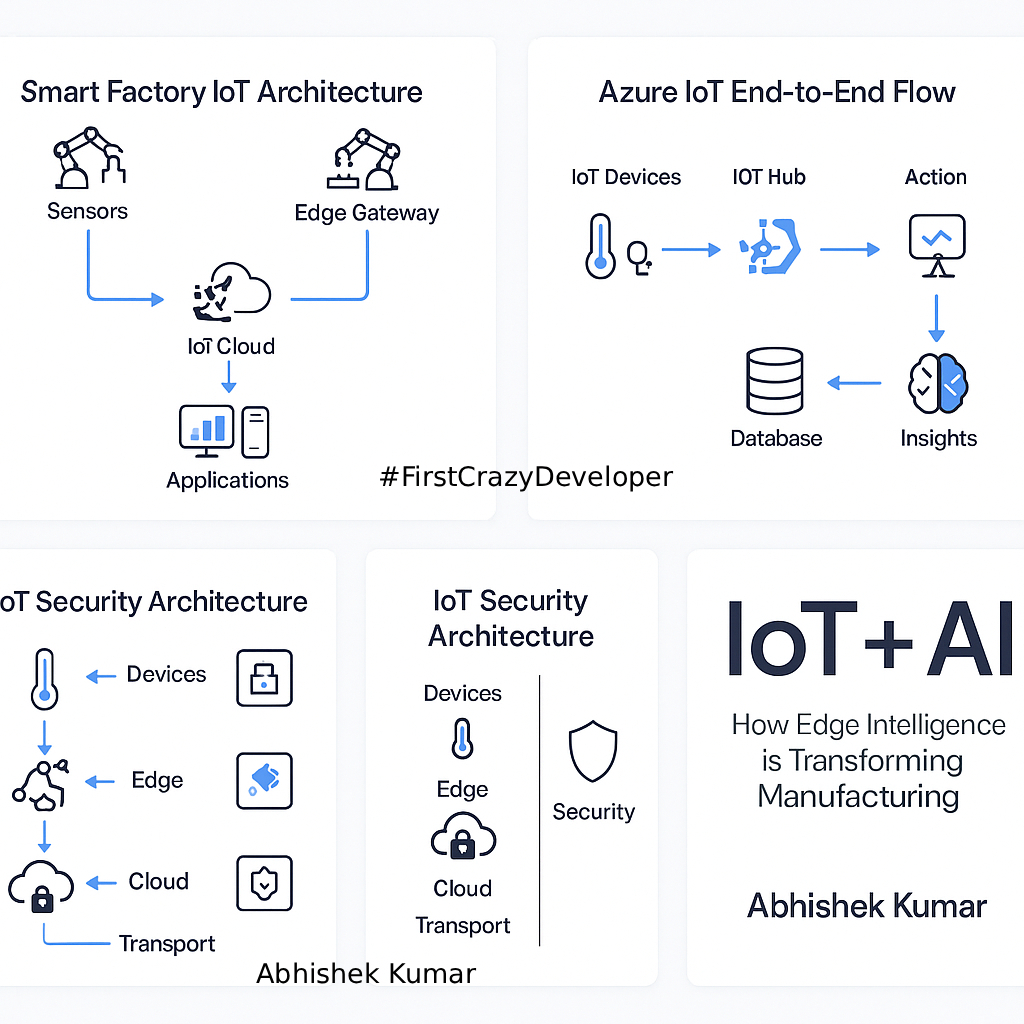
⚙️ Real IoT Architecture: Sensor → Edge → Cloud → AI → Action
Add this section to show how IoT + AI works in modern enterprises.
✨ Example Use Case
Smart Manufacturing (Paint Production Line)
- Temperature sensors → maintain viscosity
- Accelerometers → detect machine vibration
- Gas sensors → monitor VOC emissions
- Cameras → detect surface defects
🧠 Full Azure Pipeline
🧪 Edge AI on Raspberry Pi — Mini Inferencing Example
🧠 Python Example – Running a Tiny ML Model on Edge
from tflite_runtime.interpreter import Interpreter
import numpy as np

interpreter = Interpreter("model.tflite")
interpreter.allocate_tensors()

input = interpreter.get_input_details()[0]
output = interpreter.get_output_details()[0]

sample = np.array([[23.5]], dtype=np.float32)
interpreter.set_tensor(input['index'], sample)
interpreter.invoke()

result = interpreter.get_tensor(output['index'])
print("Predicted label:", result)
🛰️ IoT Sensor Communication Protocols
🔌 Communication Types
| Protocol | Usage | Why Use It? |
|---|---|---|
| MQTT | Lightweight messaging | Best for IoT → Azure IoT Hub |
| HTTP/REST | Device to API | Simple but heavy |
| CoAP | Constrained devices | Fast + supports multicast |
| LoRaWAN | Low-power long-range | Agriculture, smart cities |
| BLE | Close-range sensors | Wearables, health devices |
📡 MQTT vs HTTP Example
MQTT → Sends only data
HTTP → Sends headers + metadata + payload
MQTT is faster & cheaper → perfect for IoT.
🔐 IoT Security Section
Add this to show enterprise-level thinking.
🔒 Security Best Practices
✔ Use X.509 certificates for device identity
✔ Enforce AES-256 device encryption
✔ Use Azure IoT Defender for anomaly detection
✔ Rotate symmetric keys periodically
✔ Disable default ports on edge devices
✔ Use private endpoints for IoT Hub
🚫 Example of Insecure Code
device_key = "hardcoded_key_123" # ❌ NEVER DO THIS
✅ Secure Version (via ENV)
import os
device_key = os.getenv("DEVICE_KEY")
📊 Sensor Benchmark
| Sensor | Response Time | Accuracy | Cost | Power |
|---|---|---|---|---|
| DHT22 (Temp/Humidity) | 2s | ±0.5°C | Low | Very low |
| MQ-2 Gas Sensor | Instant | Medium | Low | Medium |
| MPU6050 Accelerometer | Fast | High | Medium | Low |
| VL53L0X Distance | Very Fast | High | Medium | Low |
This makes your blog more educational and practical.
🌐 IoT in Real Life
🏥 Healthcare
- Patients wear sensors → data goes to mobile app → alerts doctors instantly.
🚗 Automotive
- Cars detect tire pressure, engine vibration → send diagnostics to cloud.
🏭 Factories (Paint + Chemical Industry)
- Sensors monitor tank temperature
- Level sensors avoid overfill
- Gas sensors detect VOCs
- Accelerometers detect machine failure
🧩 Build Your First IoT Project
🔧 What You Need
- Raspberry Pi
- DHT22 Sensor
- Azure IoT Hub
- Python SDK
🚀 Full Working Code (Python)
from azure.iot.device import IoTHubDeviceClient, Message
import Adafruit_DHT, time

client = IoTHubDeviceClient.create_from_connection_string("<conn>")

while True:
    h, t = Adafruit_DHT.read_retry(22, 4)
    msg = Message(f'{{"temp": {t}, "hum": {h}}}')
    client.send_message(msg)
    print("Sent:", msg)
    time.sleep(5)
💡 Abhishek Take
IoT sensors are not gadgets — they are digital senses of a connected universe.
When sensors meet AI, the world moves from reactive to predictive.
From smart factories to smart homes, sensors enable automation that feels like magic — but it’s pure engineering.
The future belongs to systems that can sense, think, and act autonomously.
IoT sensors aren’t just devices — they are the foundation of smart ecosystems.
From industrial plants to smart homes, sensors enable data-driven automation and AI insights that define modern digital transformation.
Whether it’s monitoring paint temperature in a manufacturing line or tracking humidity in warehouses — sensors are the unsung heroes behind the IoT revolution.
💬 Drop a comment if you want
✔ Source Code
✔ Architecture Diagrams
✔ Raspberry Pi Setup Guide
✔ Azure IoT Hands-on Labs
Happy to share! 🚀
#IoT #IoTSensors #AzureIoT #EdgeAI #SmartFactory #Industry40
#IoTArchitecture #AzureDeveloper #CloudArchitecture
#AI #MachineLearning #FirstCrazyDeveloper #AbhishekKumar
#Python #CSharp #AzureSolutions #TechBlog #Developers
 First Crazy Developer
Leave a comment