
✍️ 𝐁𝐲 𝐀𝐛𝐡𝐢𝐬𝐡𝐞𝐤 𝐊𝐮𝐦𝐚𝐫 | #𝐅𝐢𝐫𝐬𝐭𝐂𝐫𝐚𝐳𝐲𝐃𝐞𝐯𝐞𝐥𝐨𝐩𝐞𝐫
⭐ Why Every Enterprise Needs RAG Today
Modern enterprises generate massive unstructured data:
- Technical PDFs
- SOPs, Work Instructions
- Product specification sheets
- Safety & compliance documents
- ERP/PLM extracts
- Regulatory & MSDS documents
- Knowledge Base / Confluence pages
Most of this data remains locked, making organizations slow, dependent on SMEs, error-prone, and high-cost.
A Retrieval-Augmented Generation (RAG) system solves this by:
- Searching the right knowledge
- Grounding LLM answers in enterprise data
- Reducing hallucinations
- Providing trusted responses
- Improving productivity 5×–10×
Azure provides the most robust platform to build secure, compliant, scalable enterprise RAG.
🚀 What Happens if You Don’t Use Enterprise RAG?
| Without RAG | Impact |
|---|---|
| Employees manually search across 20+ systems | Slow decisions, inconsistent outputs |
| LLM hallucinates wrong info | Compliance and safety risks |
| No grounding = unreliable AI | Loss of business trust, rejected by leadership |
| Data is siloed | Data duplication + support tickets explode |
| SMEs overloaded | High cost + burnout |
| No audit logging | Regulatory failure |
Enterprises that deploy RAG report 50–70% reduction in support tickets and 4× faster decision-making.
🏗️ Enterprise-Grade RAG Architecture on Azure
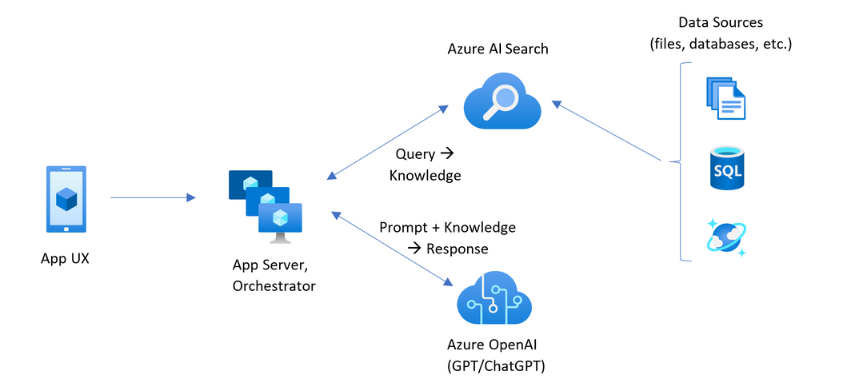

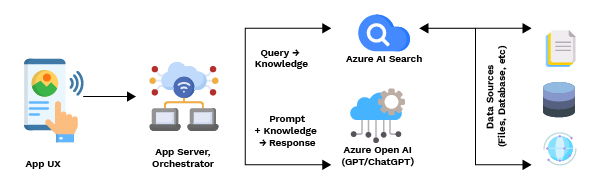
Data Ingestion Layer
Data Sources:
- SharePoint, OneDrive
- Azure Blob Storage
- SAP export PDFs
- Confluence/HTML
- SQL/ERP systems
- File shares
Azure Services:
- Azure Data Factory – scheduled ingestion
- Azure Functions – micro ETL
- Azure Logic Apps – connectors for SharePoint/Teams
- Azure Storage – raw & processed layers
Preprocessing & Chunking Layer
Azure Function / Databricks performs:
- Text extraction
- PDF parsing
- Cleaning, normalization
- Smart chunking (semantic + structural)
- Metadata enrichment
Best practice:
Use Hybrid Chunking Strategy → paragraphs + semantic boundaries.
Embedding + Indexing Layer
Azure Services:
- Azure OpenAI Embeddings (text-embedding-3-large or small)
- Azure Cognitive Search Vector Index
This creates:
- Vector embeddings
- Metadata filters
- Semantic search
- Hybrid BM25+Vector scoring
Retrieval Layer
- Hybrid search (vector + keyword + metadata)
- Re-ranking
- Multi-document retrieval
- Answer grounding
Generation Layer (LLM Orchestration)
Use:
- Azure OpenAI GPT-4o / GPT-5
- Azure AI Foundry Prompt Flow
- Semantic Kernel / LangChain
Capabilities:
- Retrieval
- Context building
- Response generation
- Safety filters
- Audit logging
API + Application Layer
- Azure Function API
- Azure App Service
- PowerApps / Teams bot
- Web UI with React / Next.js
Enterprise Security Layer (Mandatory)
- MS Entra ID Authentication
- Private Endpoints
- VNet Integration
- Key Vault for secrets
- RBAC + PIM
- Logging (App Insights + Log Analytics)
This ensures:
- No data leakage
- SOC2 / GDPR compliance
- Full auditability
⭐ Real-World Example: Manufacturer RAG
(Fully generalized — no confidential data, no internal systems, no customer-specific designs.)
Purpose: To help decision makers understand what a RAG system in a paint & coatings manufacturing company looks like, why it matters, and how it solves real business challenges.
🎯 Business Problem (Before RAG)
A paint and coatings manufacturer typically handles millions of documents, such as:
- Product formulation instructions
- Mixing & dispersion guidelines
- Plant SOPs
- Regulatory compliance rules (GHS, SDS, TDS)
- QA test methods
- Drying curves & environmental conditions
- Manufacturing batch sheets
- Hazard statements
- Color shade recipes
- Troubleshooting guides
Employees across:
- Production plants
- R&D labs
- Technical service teams
- Safety & regulatory teams
- Quality assurance
- Supply chain
- Customer support
…spend hours searching through:
- PDFs
- SharePoint folders
- Local drives
- Confluence pages
- SAP exports
- Email attachments
This causes major business impact:
📉 Problems Without RAG
Slow decisions on the shop floor
Operators need answers fast (e.g., “What is the drying time for this batch at 25°C?”).
Searching PDFs → causes production delays.
High dependency on SMEs
R&D and Technical Specialists receive repeated queries:
- “Which solvent ratio to mix?”
- “Which hazard phrases apply?”
- “Is this formula approved for region X?”
This slows down innovation.
Risk of wrong or outdated information
Employees unknowingly use old Word/PDF versions → compliance gaps in SDS/TDS.
Inconsistent answers
Two engineers might respond differently to the same question.
5–10 minutes wasted per search
Across thousands of employees → millions in hidden cost.
🎯 Goal
Replace manual searching with an AI assistant that answers instantly,
BUT only using official, approved documents.
This is where Enterprise RAG (Retrieval-Augmented Generation) is used.
⭐ What the RAG System Does (Simplified)
📌 RAG =
Search engine + LLM reasoning + enterprise data governance + grounding
Imagine a system where a plant operator can ask:
“Give me the mixing ratio and safety precautions for Product Z at 30°C.”
And the AI immediately responds:
- Using only approved technical documents
- Citing the exact PDF page
- In the operator’s language
- With no hallucinations
- With guaranteed compliance
🔧 Technical Architecture (Simple Explanation)

All technical documents go to Azure Blob Storage
SDS, TDS, SOPs, formulas, QC test methods, guidelines.
Azure Cognitive Search creates vector index
Breaks PDFs into chunks
→ creates embeddings
→ adds metadata (product code, region, language)
Azure OpenAI handles reasoning
LLM generates answers grounded in the retrieved document data only.
Teams Bot / Web app used by operators and engineers
Ask any question → instant answer.
Security Layer
- MS Entra ID
- Private Endpoints
- Encryption at rest
- Logged access
- Language-based access (e.g., R&D only)
Real Questions the RAG System Can Answer
For Production Teams
- “Provide dispersion speed and time for batch 7210.”
- “How do I fix foam during mixing?”
- “What is the recommended drying temperature?”
For R&D
- “Compare formulation differences between revision 4 and 6.”
- “List all ingredients that require hazard labeling.”
For Safety/Regulatory
- “Does this solvent require GHS02?”
- “What are the PPE requirements for Product A?”
For Technical Support
- “Customer complains about shade mismatch — troubleshooting steps?”
For Quality Assurance
- “Which viscosity method applies for product code P-238?”
📈 Business Impact (Generalized)
| Area | Before RAG | After RAG |
|---|---|---|
| Average time to find technical info | 10–20 minutes | 5–8 seconds |
| Dependency on senior experts | Very high | 70% reduction |
| Document inconsistency | Frequent | Single source of truth |
| Compliance risk | Medium–High | Low (grounded answers) |
| Knowledge access | Siloed | Instant & democratized |
| Support tickets | 300–400/month | ↓ 60–75% |
📘 Clear Example (Generalized — no internal data)
Operator asks:
“What is the drying time for the exterior paint X123 at 25°C and 50% humidity?”
How RAG answers:
- Vector search finds relevant chunks from:
- SDS document
- Technical Data Sheet
- Drying Curve PDF
- LLM reads extracted data
- AI responds:
Drying time for Product X123 at 25°C and 50% RH:
- Surface Dry: 30 min
- Hard Dry: 4 hours
- Recoat: 2 hours
(Source: Technical Data Sheet — Page 4, Revision 3)
For business:
- Faster operations
- No errors
- Consistent answers
- Removes downtime
🔥 Why RAG is a Game Changer for Industry
| Challenge | How RAG Solves |
|---|---|
| Huge technical documentation | Converts into searchable, chunked, vector index |
| Operators struggle with PDFs | Ask in natural language |
| Compliance rules constantly updating | RAG auto-pulls most recent version |
| Different plants follow different practices | Standardized knowledge retrieval |
| SME bottleneck | RAG becomes the “expert assistant” |
🏭 Final Summary (Easy to Explain to Leadership)
RAG turns the entire organization’s technical knowledge into one intelligent system that can answer any question instantly, safely, and accurately.
It removes:
❌ Delays
❌ Manual searching
❌ Errors
❌ Outdated info
❌ SME overload
❌ Compliance risks
It gives:
✔ Instant access to the right knowledge
✔ Grounded answers from approved documents
✔ Productivity boost across plants & R&D
✔ A single source of truth
✔ Lower cost & higher efficiency
🧠 FULL END-TO-END RAG IMPLEMENTATION CODE (PYTHON)
(Enterprise-grade, production-friendly)
📌 Step 1: Install dependencies
pip install azure-search-documents azure-identity openai langchain pypdf python-dotenv tiktoken
📌 Step 2: Create Embeddings + Upload to Azure Cognitive Search
import os
from dotenv import load_dotenv
from azure.search.documents import SearchClient
from azure.search.documents.indexes import SearchIndexClient
from azure.search.documents.indexes.models import (
    SimpleField, VectorSearch, VectorSearchProfile, HnswAlgorithmConfiguration,
    SearchIndex, SearchField, SearchFieldDataType
)
from azure.core.credentials import AzureKeyCredential
from openai import AzureOpenAI
from langchain.text_splitter import RecursiveCharacterTextSplitter
import json

load_dotenv()

service_endpoint = os.getenv("AZURE_SEARCH_ENDPOINT")
index_name = "enterprise-rag-index"
search_key = os.getenv("AZURE_SEARCH_KEY")

openai_client = AzureOpenAI(
    api_key=os.getenv("OPENAI_API_KEY"),
    azure_endpoint=os.getenv("OPENAI_ENDPOINT"),
    api_version="2024-05-01-preview"
)

# Create vector index
index_client = SearchIndexClient(service_endpoint, AzureKeyCredential(search_key))

fields = [
    SimpleField(name="id", type=SearchFieldDataType.String, key=True),
    SearchField(name="content", type=SearchFieldDataType.String),
    SearchField(name="content_vector", type=SearchFieldDataType.Collection(SearchFieldDataType.Single)),
]

vector_search = VectorSearch(
    algorithms=[HnswAlgorithmConfiguration(name="HNSW")],
    profiles=[VectorSearchProfile(name="default", algorithm="HNSW")]
)

index = SearchIndex(
    name=index_name,
    fields=fields,
    vector_search=vector_search
)

index_client.create_or_update_index(index)

# Upload documents

documents = [...]  # Load your SOP/PDF text

splitter = RecursiveCharacterTextSplitter(chunk_size=400, chunk_overlap=50)
chunks = splitter.split_text(documents)

search_client = SearchClient(service_endpoint, index_name, AzureKeyCredential(search_key))

batch = []
for i, chunk in enumerate(chunks):
    embedding = openai_client.embeddings.create(
        model="text-embedding-3-large",
        input=chunk
    ).data[0].embedding

    batch.append({"id": str(i), "content": chunk, "content_vector": embedding})

search_client.upload_documents(batch)
print("Uploaded", len(batch), "documents")
⭐ Python: Retrieval + RAG Completion
def enterprise_rag(query: str):

    query_emb = openai_client.embeddings.create(
        model="text-embedding-3-large",
        input=query
    ).data[0].embedding

    results = search_client.search(
        search_text=None,
        vectors=[("content_vector", query_emb, 5)],
        select=["content"]
    )

    context = "\n".join([doc["content"] for doc in results])

    completion = openai_client.chat.completions.create(
        model="gpt-4o",
        messages=[
            {"role": "system", "content": "You are an enterprise AI assistant. Answer using ONLY the provided context."},
            {"role": "user", "content": f"Context:\n{context}\n\nQuestion: {query}"}
        ]
    )

    return completion.choices[0].message["content"]

print(enterprise_rag("What is the drying time for Product X?"))
🟦 C# CODE (Azure OpenAI + Cognitive Search RAG)
using Azure;
using Azure.Search.Documents;
using Azure.Search.Documents.Models;
using OpenAI.Chat;
using OpenAI;
using System.Text;

public async Task<string> RagQuery(string query)
{
    var searchClient = new SearchClient(
        new Uri(Environment.GetEnvironmentVariable("AZURE_SEARCH_ENDPOINT")),
        "enterprise-rag-index",
        new AzureKeyCredential(Environment.GetEnvironmentVariable("AZURE_SEARCH_KEY"))
    );

    var openai = new OpenAIClient(
        new Uri(Environment.GetEnvironmentVariable("AZURE_OPENAI_ENDPOINT")),
        new AzureKeyCredential(Environment.GetEnvironmentVariable("AZURE_OPENAI_KEY"))
    );

    var embedding = await openai.GetEmbeddingsAsync(
        "text-embedding-3-large",
        query
    );

    var results = searchClient.Search<SearchDocument>(
        searchText: null,
        new SearchOptions
        {
            VectorSearch = new VectorSearchOptions
            {
                Queries =
                {
                    new VectorizedQuery("content_vector", embedding.Value.Data[0].Embedding.ToArray())
                    {
                        KNearestNeighborsCount = 5
                    }
                }
            }
        }
    );

    var context = new StringBuilder();
    await foreach (var r in results.GetResultsAsync())
    {
        context.AppendLine(r.Document["content"].ToString());
    }

    var chat = await openai.GetChatCompletionsAsync(
        "gpt-4o",
        new ChatRequest
        {
            Messages =
            {
                new ChatMessage("system", "You are an enterprise assistant. Answer only based on context."),
                new ChatMessage("user", $"Context: {context}\n\nQuestion: {query}")
            }
        }
    );

    return chat.Value.Choices[0].Message.Content[0].Text;
}
🔐 Enterprise Governance & Security Checklist
To deploy RAG in production, enterprises must enable:
✔ MS Entra ID + Conditional Access
✔ Private Endpoint for OpenAI
✔ VNet Integration for Cognitive Search
✔ TLS 1.2/1.3 enforcement
✔ Managed Identity for Functions
✔ Key Vault for secrets
✔ Logging & masking PII
✔ Audit logs for compliance (pharma, chemical, banking)
This ensures no data ever leaves Azure, which is critical for regulated industries.
💼 Business Impact Summary
| Business Outcome | Value Delivered |
|---|---|
| Faster decision-making | 10× productivity |
| Reduced dependency on SMEs | 60–80% reduction |
| Zero hallucinations | Higher trust |
| Knowledge democratization | Anyone can ask natural queries |
| Regulatory compliance | Audit-ready |
| Cost-saving | Reduce support tickets & manual search effort |
📌 Abhishek Take
Enterprise RAG is not “nice to have” — it is mandatory for AI transformation.
Companies that adopt Azure RAG architecture:
- Empower employees
- Reduce operational friction
- Unlock hidden knowledge
- Improve compliance
- Become AI-ready organizations
And most importantly—
👉 Their business decisions move from slow & manual → to fast & intelligent.
#Azure #AzureAI #AzureOpenAI #RetrievalAugmentedGeneration #RAG #EnterpriseAI #VectorSearch #AIArchitecture #CloudComputing #OpenAI #GenerativeAI #AIForBusiness #Python #DotNet #CSharp #AzureDeveloper #AIEngineer #TechBlog #FirstCrazyDeveloper #AbhishekKumar
 First Crazy Developer
Leave a comment