
✍️ By Abhishek Kumar | #FirstCrazyDeveloper
🌍 Why This Comparison is Critical
When building solutions in Azure, one of the first and most strategic decisions is choosing the right compute model.
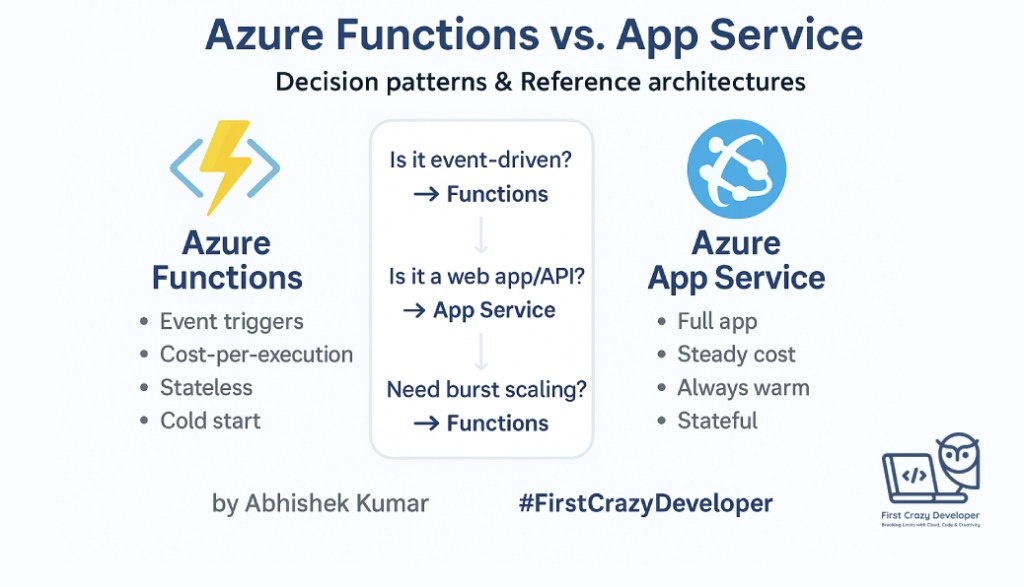
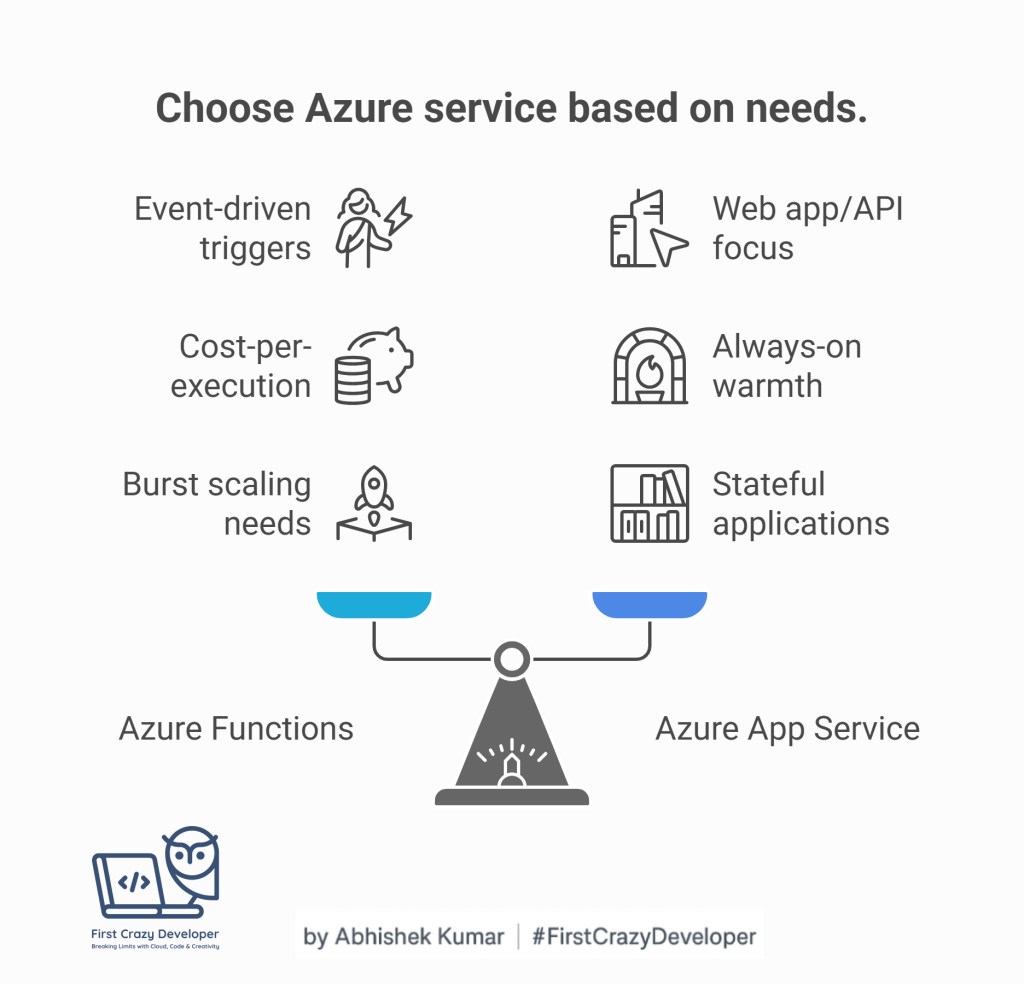
- Pick Functions when your app should respond to events, scale automatically, and minimize idle costs.
- Pick App Service when your app is a long-running, always-on, state-aware service like APIs or websites.
🌍 Why this matters
In Azure, you’ll often hear the question:
👉 Should I deploy my workload in an Azure Function or in an App Service?
Both are powerful PaaS offerings, but they serve different needs. The wrong choice can lead to unnecessary cost, operational headaches, or scalability bottlenecks.
This blog will help you decide smartly, using:
- Technical deep dives
- Real-world architecture patterns
- C# and Python code snippets
- Pros & cons for developers, architects, and businesses
- Cost efficiency: A poor choice can triple your bill.
- Scalability: Wrong model = outages under load.
- Latency & UX: Cold starts in Functions vs. warm instances in App Service.
- Maintainability: Functions shine for micro-tasks, App Service for complex apps.
🏗️ The Core Difference
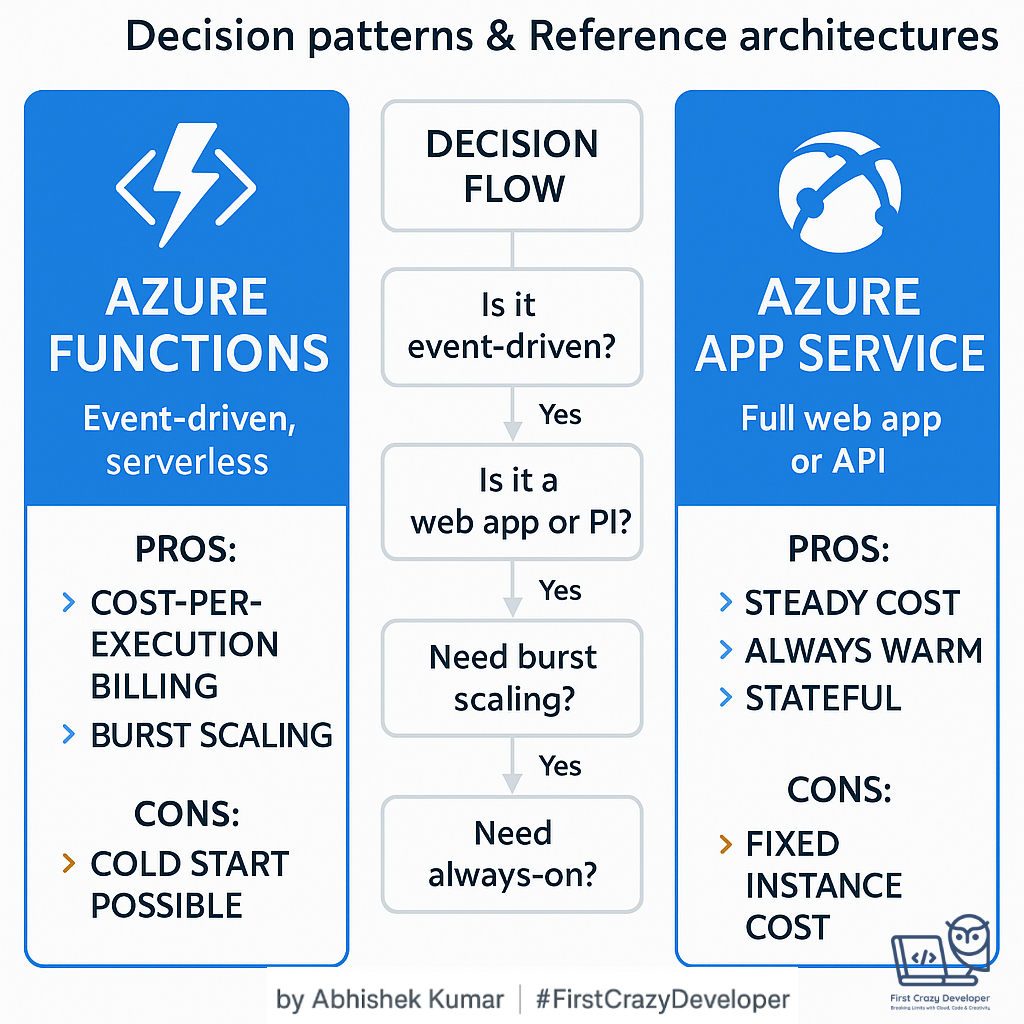
| Feature | Azure Functions | Azure App Service |
|---|---|---|
| Programming Model | Event-driven, serverless | Web apps, APIs, background jobs |
| Scaling | Auto-scale per execution (consumption) | Scale-out at instance level |
| Billing | Pay-per-execution | Pay per instance (fixed/hourly) |
| Statefulness | Stateless (use Durable Functions for workflows) | Stateful support (sessions, caching, etc.) |
| Best for | Lightweight, event-based, async processes | Web APIs, full web apps, long-running workloads |
| Triggers | HTTP, Timer, Queue, Event Grid, Service Bus | HTTP endpoints (APIs, MVC apps, Blazor, etc.) |
| Cold Start | Possible in Consumption plan | None (always warm) |
Understanding these trade-offs separates solution engineers from cloud architects.
🧩 Feature-by-Feature Breakdown
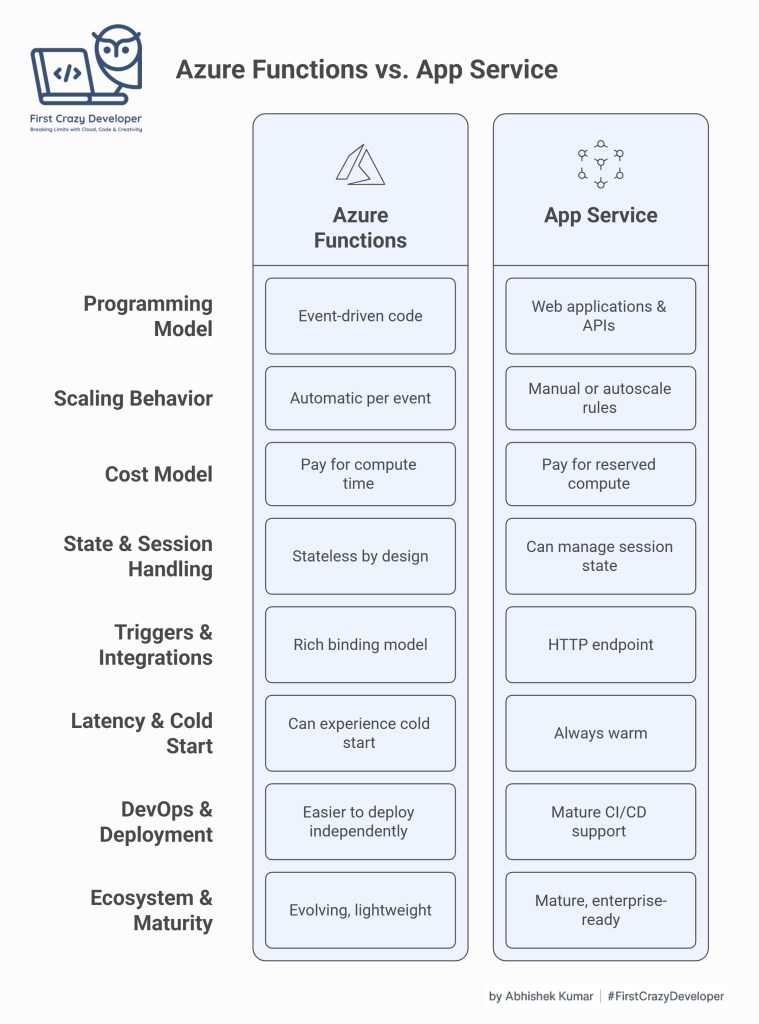
1️⃣ Programming Model
- Azure Functions: Designed for event-driven code. Each function is small, independent, and triggered by an event (HTTP call, queue message, blob upload, timer). Great for microservices and integrations.
- App Service: Built for traditional web applications & APIs. You deploy a full ASP.NET Core, Java, Node.js, or Python app. Supports MVC, REST APIs, Razor, Blazor, Django, Flask.
Architect’s Note: Functions = Lego bricks, App Service = full building.
2️⃣ Scaling Behavior
- Functions: In the Consumption Plan, scale is automatic per event. If you get 1000 queue messages, Azure spawns enough instances to process them. Billing is per-execution. In Premium Plan, you can pre-warm instances to avoid cold start.
- App Service: You scale manually or via autoscale rules (CPU %, request count, etc.). Billing is per instance, not per execution.
Architect’s Note: For bursty workloads, Functions give better elasticity. For predictable steady traffic, App Service is more efficient.
3️⃣ Cost Model
- Functions: Pay only for compute time + memory. Example: 1M executions free per month. Great for unpredictable workloads.
- App Service: Pay for reserved compute (hourly). Ideal for steady workloads like APIs with constant traffic.
Architect’s Note: If your app idles a lot → Functions save money. If your app is always hot → App Service saves money.
4️⃣ State & Session Handling
- Functions: Stateless by design. To keep state, you use Durable Functions (for orchestrations, retries, chaining). Session state must be stored in external services (Cosmos DB, Redis, SQL).
- App Service: Can manage session state in memory or with Redis. Supports sticky sessions, in-process caching, and long-running requests.
Architect’s Note: If your business logic is complex and session-heavy (e.g., shopping carts, user logins) → App Service fits better.
5️⃣ Triggers & Integrations
- Functions: Rich binding model — triggers from HTTP, Timer, Event Grid, Service Bus, IoT Hub, Cosmos DB. Easy to connect multiple Azure services.
- App Service: Works as an HTTP endpoint. For messaging integration, you must handle SDKs/code yourself.
Architect’s Note: If integration-heavy → Functions. If only web requests → App Service.
6️⃣ Latency & Cold Start
- Functions: In Consumption Plan, can experience cold start (few hundred ms – 5s) when idle. Premium Plan mitigates this.
- App Service: Always warm. Better for latency-sensitive apps (e.g., trading platforms).
Architect’s Note: If latency SLAs < 1s → App Service wins.
7️⃣ DevOps & Deployment
- Functions: Support CI/CD via Azure DevOps/GitHub. Smaller code units, easier to deploy independently. Great for microservices.
- App Service: Mature CI/CD support. Deploy web apps with slots, warm up before swap. Great for monoliths or APIs.
8️⃣ Ecosystem & Maturity
- Functions: Evolving ecosystem, lightweight but opinionated.
- App Service: More mature, enterprise-ready, battle-tested for web workloads.
🧩 Real-World Scenarios
✅ When to use Azure Functions
- Event-driven integration: E.g., process messages from Service Bus when an order is placed.
- IoT data ingestion: Handle millions of telemetry events via Event Hub.
- Automated tasks: Nightly ETL pipelines, file transformations.
- AI Pipelines: Trigger model inference on blob upload.
✅ When to use Azure App Service
- Enterprise web apps: E-commerce portals, intranet sites.
- Public APIs: Payment APIs, partner integration endpoints.
- Line-of-business apps: Legacy migration from on-prem IIS.
- Microservices base: Where session handling/state is needed.
🏗️ Reference Architectures
Scenario A — Event-Driven Order Processing (Azure Functions)
Flow: Event → Service Bus → Function → Cosmos DB → Power BI
Scenario: A retail company needs to process order events from a queue, enrich with product info, and save into Cosmos DB.
Flow:
Event → Service Bus → Azure Function → Cosmos DB → Power BI
// C# - Azure Function (Queue Trigger)
[Function("OrderProcessor")]
public static async Task Run(
    [ServiceBusTrigger("orders", Connection = "ServiceBusConnection")] string orderMsg,
    [CosmosDBOutput("OrdersDB", "Orders", Connection = "CosmosConnection")] IAsyncCollector<object> output,
    ILogger log)
{
    var order = JsonSerializer.Deserialize<Order>(orderMsg);
    log.LogInformation($"Processing order {order.Id}");
    await output.AddAsync(order);
}
# Python - Azure Function (Queue Trigger)
import logging
import json
import azure.functions as func

def main(msg: func.ServiceBusMessage, outputDoc: func.Out[func.Document]):
    order = json.loads(msg.get_body().decode("utf-8"))
    logging.info(f"Processing order {order['Id']}")
    outputDoc.set(func.Document.from_dict(order))
Scenario B — Enterprise Web Portal (App Service)
Flow: Users → Front Door → App Service → SQL DB
Scenario: A financial services company wants a customer portal with secure APIs and frontend.
Flow:
Users → Azure Front Door → App Service (API + UI) → SQL DB
C# Web API (ASP.NET Core in App Service):
[ApiController]
[Route("api/[controller]")]
public class CustomerController : ControllerBase
{
    private readonly SqlConnection _conn;

    public CustomerController(IConfiguration config)
    {
        _conn = new SqlConnection(config.GetConnectionString("CustomerDB"));
    }

    [HttpGet("{id}")]
    public async Task<IActionResult> GetCustomer(int id)
    {
        await _conn.OpenAsync();
        var cmd = new SqlCommand("SELECT * FROM Customers WHERE Id=@id", _conn);
        cmd.Parameters.AddWithValue("@id", id);
        var reader = await cmd.ExecuteReaderAsync();
        if (await reader.ReadAsync())
            return Ok(new { Id = reader["Id"], Name = reader["Name"] });
        return NotFound();
    }
}
Python Flask App (App Service on Linux):
from flask import Flask, jsonify
import pyodbc

app = Flask(__name__)

@app.route('/customer/<int:id>')
def get_customer(id):
    conn = pyodbc.connect("Driver={ODBC Driver 17 for SQL Server};Server=tcp:yourserver.database.windows.net;Database=CustomerDB;Uid=user;Pwd=pass;Encrypt=yes;TrustServerCertificate=no;Connection Timeout=30;")
    cursor = conn.cursor()
    cursor.execute("SELECT Id, Name FROM Customers WHERE Id=?", id)
    row = cursor.fetchone()
    if row:
        return jsonify({"Id": row[0], "Name": row[1]})
    return jsonify({"error": "Not found"}), 404

if __name__ == '__main__':
    app.run()
📊 Decision Flow (Architect’s Guide)
- Is workload event-driven?
- Yes → Azure Function
- No → continue
- Is workload a full web/API app?
- Yes → App Service
- Need rapid burst scaling with cost efficiency?
- Yes → Functions (Consumption)
- Need predictable performance & state management?
- Yes → App Service
💸 Cost Considerations
- Azure Functions
- Pay only for execution time and memory.
- Ideal for spiky workloads.
- Risk: Cold start delays for latency-sensitive APIs.
- App Service
- Pay for reserved compute (regardless of usage).
- Better for steady workloads.
- Scales vertically & horizontally.
🛠️ Common Gotchas
- Functions need Durable Functions for orchestrations.
- App Service with heavy traffic may need Autoscale + Front Door.
- Functions in consumption have execution timeout (default 5–10 mins).
- App Service requires patching awareness (though Azure manages OS).
✨ Abhishek Take
- If you’re building lightweight, bursty, event-driven apps, go Functions.
- If you need full-blown, always-on web apps or APIs, choose App Service.
- In practice → Many enterprises run a hybrid model: App Service for API/UI, Functions for async/offload tasks.
✅ Conclusion
Both services are complementary, not competing. Your choice should align with:
- Workload pattern (event-driven vs web app)
- Scaling model (per-execution vs per-instance)
- Cost model (spiky vs steady traffic)
- Business SLA needs (latency, state, compliance)
 First Crazy Developer
Leave a comment